Powerful Trust Signals Customers Look for in 2026
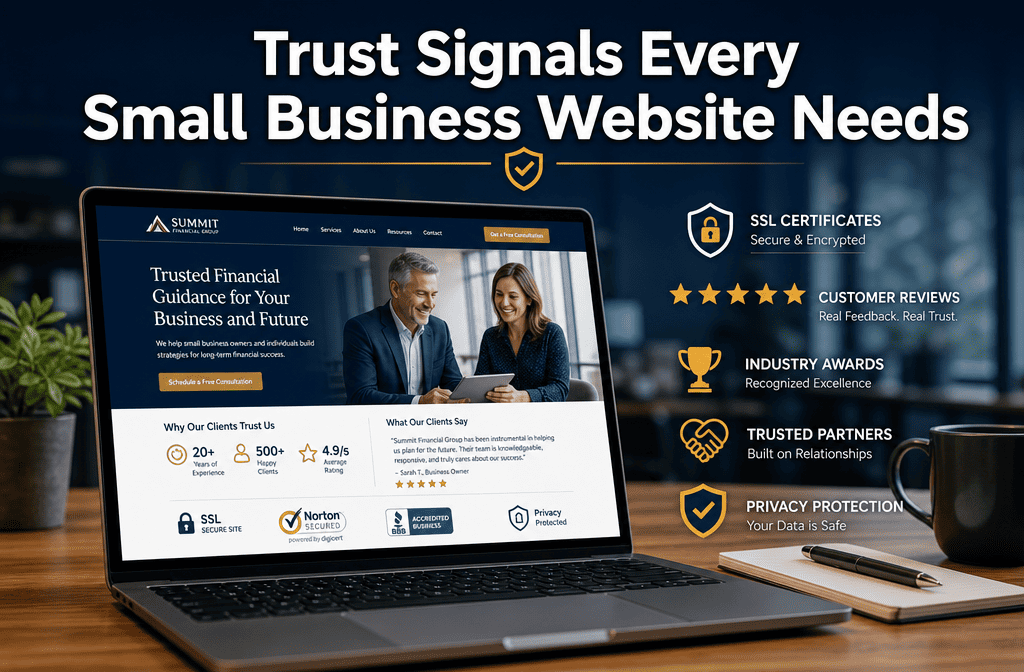
Article Summary

Who this is for: Small business owners, local service companies, MSPs, consultants, contractors, healthcare providers, and B2B service firms looking to improve website conversions and credibility.

The challenge: Most small business websites fail to build immediate trust, causing visitors to leave before contacting or buying. Weak credibility signals, outdated design, poor contact visibility, and lack of social proof reduce conversions and increase lost opportunities.

Key insights covered: Learn which website trust signals have the biggest impact on conversions, including customer testimonials, SSL certificates, professional team photos, reviews, and security badges. Discover how different industries require different trust-building elements, common mistakes that destroy credibility, and how to prioritize free vs paid trust signals for maximum ROI.

Your outcome: You’ll know exactly which trust signals to implement to increase credibility, reduce visitor hesitation, improve lead generation, and convert more website traffic into qualified customers and sales.

Quick Answer

Website trust signals are visual and content elements that prove your business is legitimate, professional, and safe to work with. Small businesses need trust signals because 94% of visitors will leave a website that appears untrustworthy, and these elements directly impact whether prospects become paying customers. The most effective trust signals include customer testimonials, clear contact information, security badges, professional photos, and transparent pricing.

Key Takeaways

• Customer testimonials with photos build credibility faster than any other trust signal
• Clear contact information, including phone, address, and business hours, reduces bounce rates
• SSL certificates and security badges are essential for any site collecting customer information
• Professional headshots and team photos help visitors connect with real people behind the business
• Industry certifications and awards establish expertise and authority in your field
• Transparent pricing and policies eliminate uncertainty that drives customers away
• Recent copyright dates and fresh content show your business is active and current
• Social media links and review integration provide third-party validation of your reputation
• Money-back guarantees or service promises reduce perceived risk for new customers
• Mobile-responsive design signals professionalism and technical competence

🚀 Ready to see how this works for your business?

We'll build your complete review generation system in 14 days. No setup fees, no technical headaches. Just a system that works from day one.

📅 Book Your Free Consultation

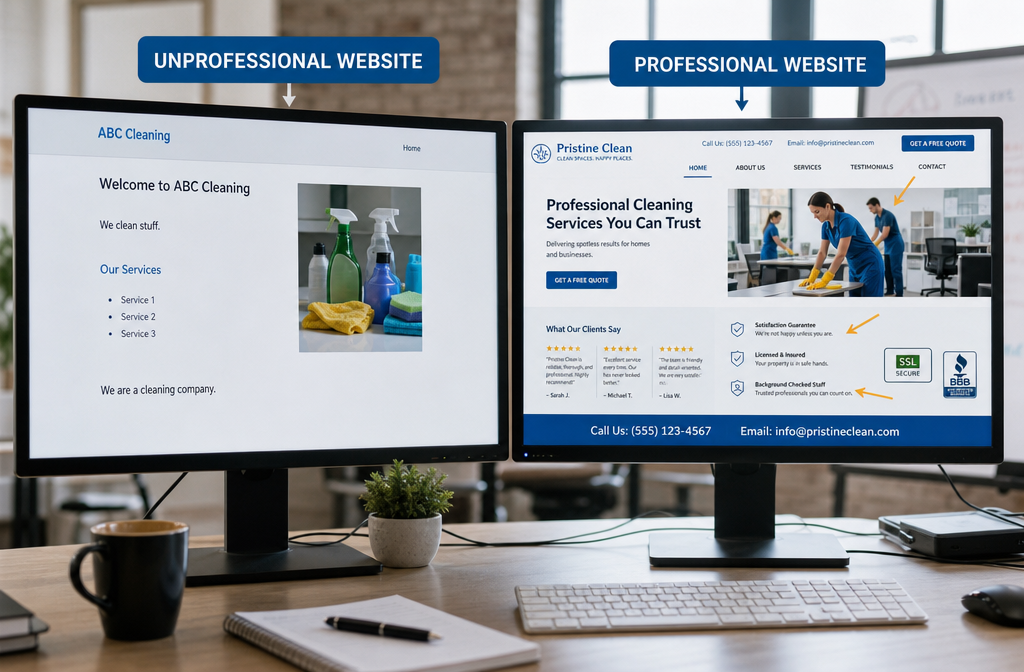
() image showing a split comparison of two small business websites side by side on desktop screens. Left screen displays

What Are Website Trust Signals and Why They Matter for Small Businesses

Website trust signals are specific elements on your site that convince visitors your business is legitimate, professional, and safe to work with. For small businesses, these signals can make the difference between a visitor bouncing in seconds or staying to become a customer.

Trust signals work because they address the fundamental question every website visitor asks: “Can I trust this business with my time and money?” When someone lands on your site, they’re making split-second judgments about your credibility. Without clear trust indicators, even the best products or services won’t convert visitors into customers.

Why trust signals are critical for small businesses:

  • Most visitors don’t know your brand yet, unlike established companies
  • You’re competing against larger competitors with bigger marketing budgets
  • Online scams have made consumers more cautious about new businesses
  • Local customers often research online before visiting or calling
  • B2B buyers need to justify their vendor choices to colleagues or bosses

The psychology behind trust signals is simple: people buy from businesses they trust. When your website clearly demonstrates professionalism, transparency, and social proof, visitors relax and focus on whether your solution fits their needs rather than whether you’re legitimate.

Common trust signal categories include:

  • Social proof (testimonials, reviews, case studies)
  • Authority indicators (certifications, awards, media mentions)
  • Transparency elements (team photos, contact info, business details)
  • Security signals (SSL certificates, payment badges, privacy policies)
  • Professionalism markers (quality design, current content, error-free copy)

We’ve seen small businesses increase their conversion rates by 20-40% simply by adding the right combination of trust signals. The key is choosing elements that align with your industry and customer expectations while staying authentic to your business strengths.

How Trust Badges and Security Icons Convert More Customers

Trust badges and security icons work by reducing perceived risk during the decision-making process. When visitors see recognizable security symbols, industry certifications, or payment provider logos, their confidence increases because these badges represent third-party validation of your business practices.

Security badges are particularly powerful for businesses that collect customer information or process payments online. An SSL certificate badge shows that data transmission is encrypted, while payment provider logos (PayPal, Stripe, Square) indicate that financial transactions are handled by trusted companies.
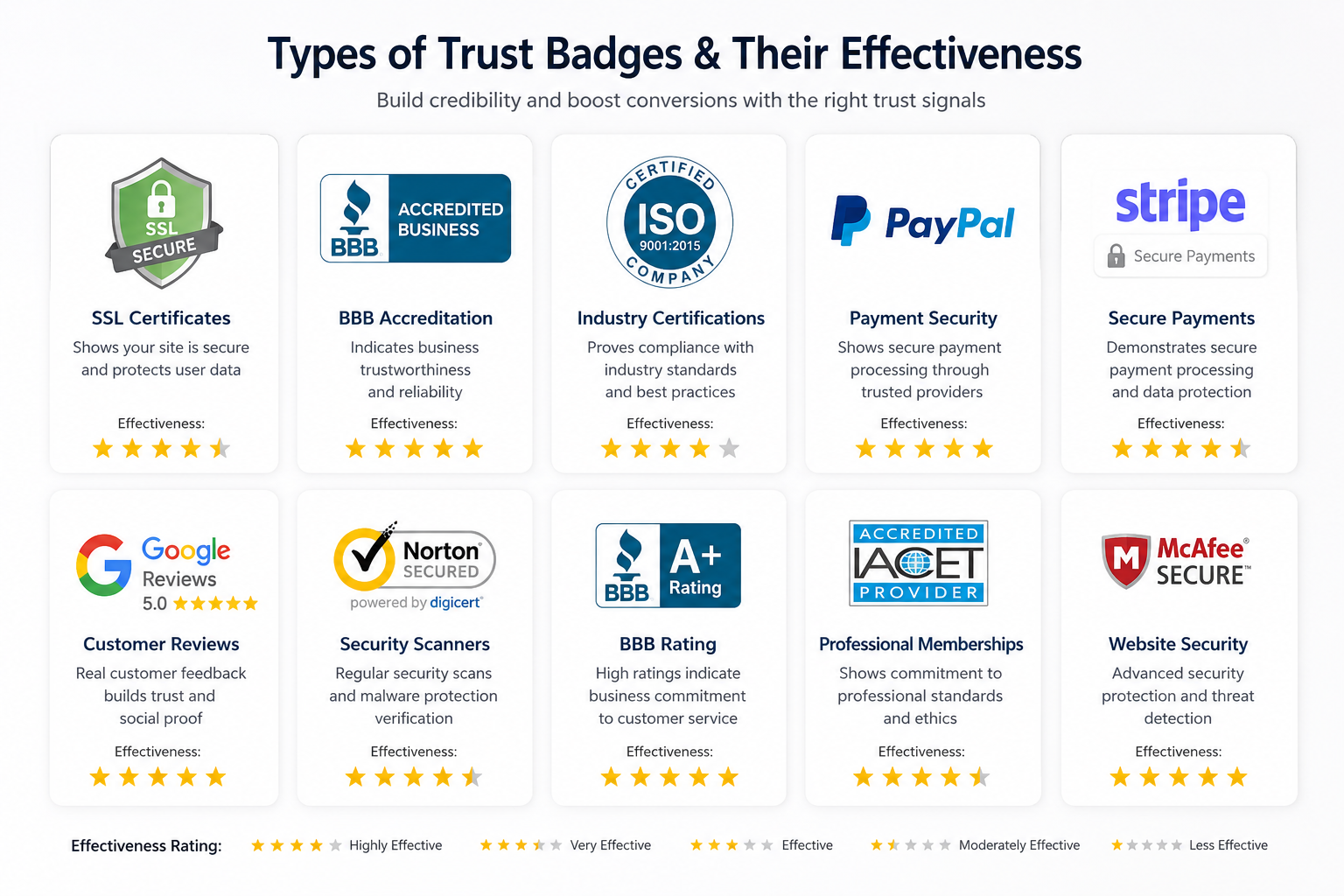
Detailed () illustration showing various trust badge types arranged in organized grid layout. Features SSL certificates, BBB

Most effective trust badges for small businesses:

  • SSL/Security certificates – Essential for any site with contact forms or e-commerce
  • Google My Business verification – Shows you’re a real, local business
  • Better Business Bureau (BBB) accreditation – Recognized consumer protection symbol
  • Industry association memberships – Demonstrates professional standards and ongoing education
  • Payment provider badges – PayPal, Stripe, or Square logos reduce payment concerns
  • Review platform integration – Google Reviews, Yelp, or industry-specific review sites

Placement strategies that maximize impact:

Place security badges near contact forms, checkout buttons, or anywhere you’re asking for customer information. Industry certifications work well in headers, footers, or dedicated “About Us” sections. Payment badges should appear on pricing pages and near purchase buttons.

The key mistake many small businesses make is displaying badges they haven’t actually earned or maintaining. Expired certificates or fake endorsements will backfire if customers investigate. Only display badges you can legitimately claim, and keep certifications current.

Measuring badge effectiveness:

Track conversion rates on pages before and after adding trust badges. Monitor where visitors drop off in your sales process – if they’re leaving at contact forms or pricing pages, security badges might help. Heat mapping tools can show whether visitors are noticing and clicking on your trust elements.

Which Trust Signals Work Best for Different Business Types

Service-based businesses need different trust signals than e-commerce sites because customers are buying expertise and relationships rather than products. Local businesses require different elements than those serving national markets. Understanding these distinctions helps you prioritize which trust signals will have the biggest impact on your specific audience.

For local service businesses (contractors, consultants, healthcare):

  • Team photos with names and credentials – Customers want to know who they’re hiring
  • Local address and phone number – Proves you’re actually in their area
  • Customer testimonials with full names and locations – Local social proof carries more weight
  • Before/after photos or case studies – Visual proof of your work quality
  • Industry licenses and insurance information – Required credibility for many service industries
  • Years in business or founding date – Establishes experience and stability

For e-commerce and product businesses:

  • Product reviews and ratings – Essential for online purchasing decisions
  • Return/refund policies clearly stated – Reduces purchase risk
  • Shipping and delivery information – Sets clear expectations
  • Payment security badges – Critical for online transactions
  • Product guarantees or warranties – Demonstrates confidence in quality
  • Customer service contact options – Shows support is available after purchase

For B2B and professional services:

  • Client logos or case studies – Proves experience with similar businesses
  • Professional certifications and credentials – Establishes expertise
  • Industry awards or recognition – Third-party validation of quality
  • Thought leadership content – Blog posts, whitepapers, or speaking engagements
  • Team LinkedIn profiles – Professional networking presence
  • Detailed service process explanations – Shows a systematic, professional approach

For professional practices (legal, medical, financial):

  • Professional headshots and bios – Personal connection and credibility
  • Education and certification details – Required trust factors for regulated industries
  • Professional association memberships – Industry standard expectations
  • Client confidentiality statements – Addresses privacy concerns
  • Office photos and location details – Physical presence reassurance
  • Appointment scheduling systems – Professional operational systems

The most successful approach combines 3-5 trust signals that directly address your customers’ biggest concerns about working with your type of business. We help our clients identify which combination works best based on their industry and target market, then we build those elements into their complete done-for-you system so everything works together from day one.

Cost Breakdown: Free vs Paid Trust Signal Options

Most effective trust signals can be implemented at little to no cost, making them accessible for small businesses with tight budgets. The key is understanding which free options provide the most impact and when paid upgrades become worthwhile investments.
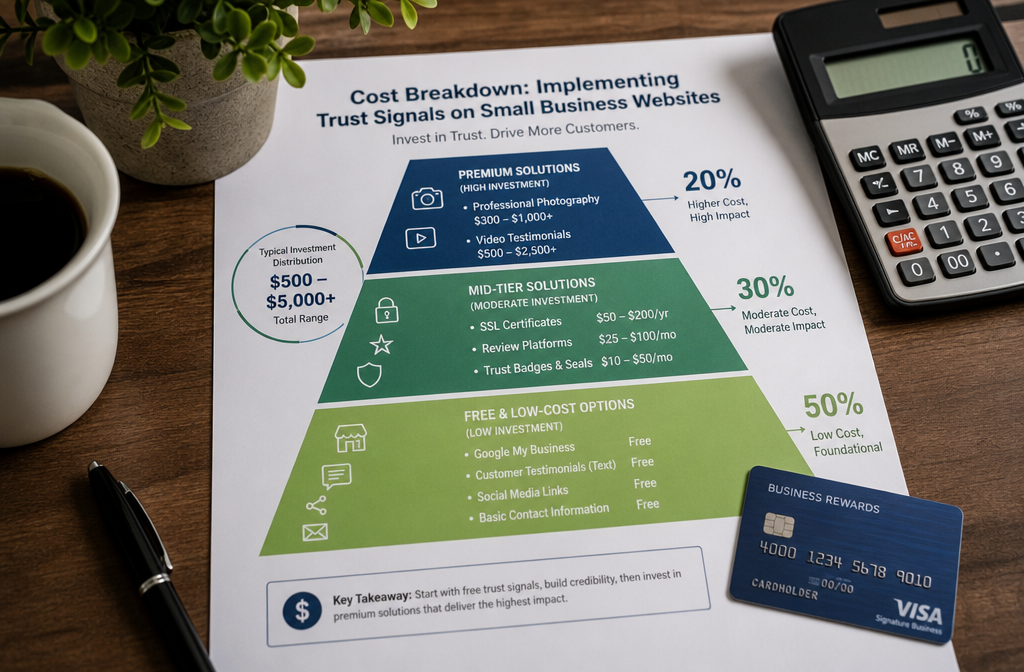
() infographic showing cost breakdown for implementing trust signals on small business websites. Visual pyramid or bar chart

Free trust signals that deliver immediate impact:

  • Google My Business listing – $0, essential for local businesses
  • Customer testimonials – Free to collect and display
  • Team photos with smartphone camera – $0 if you take them yourself
  • Contact information display – No cost, just needs to be prominent
  • Social media profile links – Free to create and maintain
  • Basic SSL certificate – Often included free with web hosting
  • Privacy policy and terms of service – Free templates available online
  • Copyright date and business founding year – No cost to display

Low-cost options ($10-100/month):

  • Professional email addresses – $5-15/month per user
  • Premium SSL certificates – $50-200/year for extended validation
  • Review management platforms – $20-100/month for automated review requests
  • Professional stock photos – $10-30/month for unlimited downloads
  • Basic security badges – $10-50/month for verified trust seals

Higher investment trust signals ($100-500/month):

  • Professional photography session – $300-1,500 one-time cost
  • Video testimonials – $500-2,000 per video, depending on production quality
  • Industry certifications – $200-1,000/year plus ongoing education requirements
  • Professional copywriting – $500-2,000 for website content that builds trust
  • Custom design elements – $1,000-5,000 for professional branding that enhances credibility

ROI considerations for trust signal investments:

Start with free options that address your customers’ biggest concerns. If you’re a local service business, invest in Google My Business optimization and customer testimonial collection before paying for premium badges. For e-commerce, prioritize security certificates and return policies over expensive photography.

When to upgrade to paid options:

Consider paid trust signals when free options aren’t converting visitors or when you’re competing against businesses with more polished presentations. Professional photography becomes worthwhile when your services are visual (contracting, healthcare, retail) or when team relationships matter (consulting, professional services).

Budget allocation strategy:

Spend 60% of your trust signal budget on elements that directly address customer objections, 30% on professional presentation (photos, design), and 10% on premium badges or certifications. This approach maximizes conversion impact while building long-term credibility.

We build all the essential trust signals into our complete done-for-you system, including professional design, SSL certificates, and optimized contact forms. This eliminates the guesswork about which elements to prioritize and ensures everything works together from day one without requiring technical knowledge on your part.

Common Trust Signal Mistakes Small Businesses Make

The biggest trust signal mistake is using fake or outdated elements that can be easily verified by customers. When visitors discover inconsistencies or false claims, it destroys credibility faster than having no trust signals at all.
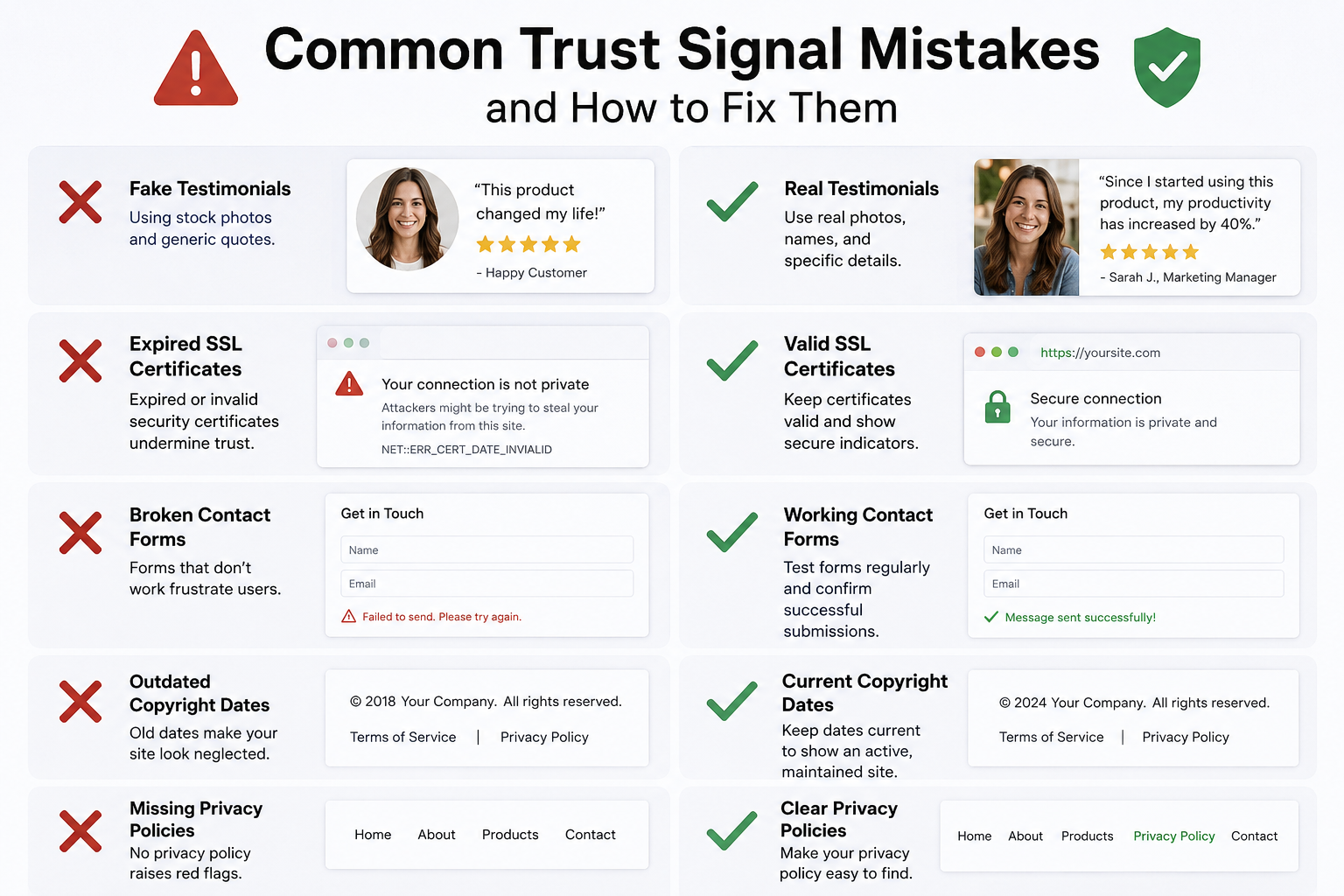
() image showing common trust signal mistakes with red X marks over problematic examples. Split into sections: fake

Fake testimonials and stock photo disasters:

Using generic testimonials with stock photos is immediately obvious to most website visitors. Real testimonials include specific details about results, challenges, or experiences that generic content lacks. Stock photos of “customers” often appear on multiple websites, making your testimonials look fabricated.

Solution: Collect real testimonials from actual customers, even if you only have a few. Ask for permission to use their full name and city. If they won’t provide a photo, use their initials or first name only rather than fake images.

Outdated or expired security certificates:

Displaying security badges for expired certifications or services you no longer use creates liability issues and destroys trust. Browsers now warn users about expired SSL certificates, making this mistake highly visible to visitors.

Solution: Set calendar reminders to renew certificates before expiration. Remove badges for discontinued services immediately. Only display current, verifiable certifications.

Contact information that doesn’t work:

Nothing destroys trust faster than phone numbers that go to voicemail indefinitely or contact forms that don’t actually send emails. Customers test these elements, especially for larger purchases or B2B services.

Solution: Test all contact methods monthly. Set up proper voicemail messages and email autoresponders. Ensure contact forms actually reach someone who responds within 24 hours.

Inconsistent business information across platforms:

Having different addresses, phone numbers, or business names on your website versus Google My Business versus social media confuses customers and hurts search rankings.

Solution: Audit all online listings quarterly. Use an identical business name, address, and phone number (NAP) everywhere. Update all platforms simultaneously when information changes.

Overloading pages with too many badges:

Displaying every possible trust badge makes your site look desperate or spam-like. Visitors become skeptical when they see dozens of certifications or awards, especially if they don’t recognize most of them.

Solution: Choose 3-5 most relevant trust signals for each page. Rotate different badges on different pages rather than cramming everything into headers or footers.

Generic or vague testimonials:

Testimonials that could apply to any business in your industry don’t provide meaningful social proof. “Great service, highly recommended!” tells visitors nothing specific about your capabilities or results.

Solution: Ask customers specific questions about their experience. What problem did you solve? What results did they achieve? What made your service different from competitors?

Missing or buried privacy policies:

With increasing privacy concerns and regulations, missing privacy policies signal unprofessionalism. Burying them in tiny footer text suggests you’re hiding something.

Solution: Create clear, accessible privacy policies. Link to them prominently on contact forms and checkout pages. Use plain language that customers can actually understand.

The most effective approach is implementing fewer trust signals correctly rather than many elements poorly. We help our clients avoid these common mistakes by building authentic trust elements into their complete done-for-you system, ensuring everything is current, consistent, and genuinely represents their business strengths.

Website Trust Signal Effectiveness Calculator

Check off the trust signals your website currently has to see your trust score and get personalized recommendations.

Essential Trust Signals

+15%
+12%
+10%
+8%

Professional Credibility

+8%
+7%
+6%
+5%

Enhanced Trust Elements

+6%
+4%
+5%
+3%

Your Trust Score

0%

Select your trust signals above to calculate your score.

Your personalized recommendations will appear here based on your business type and current trust signals.

🚀 Ready to see how this works for your business?

We'll build your complete review generation system in 14 days. No setup fees, no technical headaches. Just a system that works from day one.

📅 Book Your Free Consultation

Do Trust Signals Really Make a Difference for Local Service Businesses

Trust signals make an even bigger difference for local service businesses than for national companies because customers are choosing someone to come to their home or handle important local needs. Local customers research extensively before hiring contractors, healthcare providers, or professional services, making trust signals critical for winning their business.

Local service businesses face unique trust challenges. Customers worry about letting strangers into their homes, paying for work before it’s completed, or choosing providers who might disappear after taking payment. Trust signals directly address these concerns by proving legitimacy, competence, and local presence.

Trust signals that matter most for local services:

  • Google My Business optimization with photos and reviews – The first thing most local customers check
  • Local address and phone number prominently displayed – Proves you’re actually in their area
  • Before/after photos of actual work – Visual proof of quality and capabilities
  • Customer testimonials with full names and locations – Local social proof carries more weight
  • Insurance and licensing information – Required credibility for many service industries
  • Team photos with names and roles – Customers want to know who’s coming to their property

Industry-specific trust requirements:

Home contractors need to display licensing, insurance, and Better Business Bureau ratings because customers are making significant financial commitments. Healthcare providers must show credentials, office photos, and patient testimonials to meet regulatory expectations and patient comfort needs.

Professional services like legal or financial advisors need educational backgrounds, certifications, and case study examples because clients are trusting them with important life decisions. The stakes feel higher for local services, so trust signals need to be more comprehensive.

Local vs national trust signal differences:

National companies can rely on brand recognition and corporate credentials. Local businesses need personal credibility markers like individual team member photos, local community involvement, and neighborhood-specific testimonials. Customers want to feel like they’re hiring people they could run into at the grocery store.

Measuring local trust signal impact:

Track phone calls and contact form submissions after adding trust elements. Monitor Google My Business insights to see how many people view your photos, read reviews, or click for directions. Local businesses often see immediate increases in inquiry quality when trust signals address common customer concerns.

Common local trust signal mistakes:

Using stock photos instead of real team and work photos immediately signals inauthenticity to local customers. Displaying outdated certifications or wrong service areas confuses potential clients. Hiding contact information or using only web forms makes businesses seem less accessible than competitors who prominently display phone numbers.

The most effective approach for local service businesses is combining online trust signals with offline community involvement. We help local businesses build complete done-for-you systems that showcase their local presence, credentials, and customer results in ways that convert website visitors into phone calls and appointments.

Which Trust Signals Matter Most: E-commerce vs Service Websites

E-commerce and service websites need fundamentally different trust signals because customers are evaluating different types of risk. E-commerce buyers worry about payment security, product quality, and return policies. Service business customers focus on provider competence, reliability, and personal fit.

E-commerce trust signal priorities:

Security and transaction-focused elements top the list for online stores. Customers need confidence that their payment information is safe and that they’ll receive what they ordered. Product reviews, return policies, and shipping information directly address purchase anxiety.

  • SSL certificates and payment security badges – Non-negotiable for any site processing payments
  • Customer product reviews with photos – Social proof that products match descriptions
  • Clear return and refund policies – Reduce perceived purchase risk
  • Shipping costs and delivery timeframes – Eliminates surprise fees and sets expectations
  • Contact information for customer service – Shows support is available after purchase
  • Product guarantees or warranties – Demonstrates confidence in quality

Service website trust signal priorities:

Service businesses need to prove expertise, reliability, and personal credibility because customers are buying outcomes they can’t see in advance. The relationship and provider competence matter more than transaction security.

  • Team photos and professional bios – Personal connection and credibility
  • Customer testimonials with specific results – Proof of successful outcomes
  • Case studies or portfolio examples – Demonstrates capability and process
  • Industry certifications and credentials – Establishes expertise and ongoing education
  • Clear service process explanations – Shows a systematic, professional approach
  • Client logos or references – Third-party validation of experience

Conversion psychology differences:

E-commerce customers make faster decisions but need reassurance about transaction safety. They’re often comparing prices and features across multiple sites, so trust signals need to quickly address security and value concerns.

Service customers take longer to decide but focus more on provider fit and capability. They’re often making larger investments or longer commitments, so trust signals need to demonstrate competence and relationship potential.

Budget allocation strategies:

E-commerce businesses should invest heavily in security certificates, review management systems, and clear policy pages. These elements directly impact conversion rates and reduce cart abandonment.

Service businesses get better ROI from professional photography, testimonial collection, and credential displays. These elements help prospects feel confident about choosing their provider over competitors.

Industry-specific variations:

High-ticket e-commerce (furniture, electronics) needs more extensive trust signals than low-cost purchases. B2B service providers need different credibility markers than consumer-focused services. Healthcare and financial services have regulatory requirements that affect trust signal choices.

Testing and optimization approaches:

E-commerce sites can A/B test different badge placements, review displays, and policy presentations to measure conversion impact. Service websites should test different testimonial formats, team photo presentations, and credential displays to see what resonates with their target market.

We build industry-appropriate trust signals into our complete done-for-you systems, ensuring e-commerce clients get transaction-focused elements while service businesses receive relationship and credibility-building components that match their customers’ decision-making process.

Are Free Trust Signals as Effective as Paid Ones

Free trust signals can be just as effective as paid options when they authentically address customer concerns. The key difference isn’t cost but relevance and implementation quality. A well-crafted customer testimonial costs nothing but often outperforms expensive security badges that don’t match customer priorities.

Most effective free trust signals:

  • Customer testimonials – Often more persuasive than paid endorsements because they feel authentic
  • Google My Business optimization – Free but essential for local credibility and search visibility
  • Team photos taken with smartphones – Personal connection doesn’t require professional photography
  • Clear contact information – Costs nothing but immediately builds accessibility and transparency
  • Basic SSL certificates – Usually included free with hosting, they provide an essential security indication

When free options work best:

Free trust signals excel when they provide genuine social proof or transparency. Real customer stories, actual team photos, and authentic business information create trust because they’re obviously real rather than manufactured for marketing purposes.

Local service businesses often get better results from authentic free elements than expensive badges because customers value personal connection over corporate credentials. A handwritten thank-you note photo from a customer can outperform a paid industry award.

Limitations of free trust signals:

Free options may lack the polish or professional presentation that some industries require. Healthcare, legal, or financial services often need premium certifications and professional photography to meet customer expectations and regulatory requirements.

Free security certificates provide basic encryption but don’t include the extended validation that shows your business name in the browser address bar. For e-commerce sites, this upgrade can improve conversion rates enough to justify the cost.

When to invest in paid upgrades:

Consider paid trust signals when free options aren’t converting visitors or when you’re competing against more polished competitors. Professional photography becomes worthwhile when visual presentation significantly impacts customer decisions.

Premium security certificates make sense for e-commerce sites where the extended validation badge increases purchase confidence. Industry certifications justify their cost when customers specifically look for those credentials.

ROI comparison strategies:

Test free implementations first to establish baseline conversion rates. Then upgrade individual elements and measure impact. Often, combining free authentic elements with one or two premium upgrades provides the best cost-to-conversion ratio.

Quality over quantity principle:

Three well-implemented free trust signals typically outperform ten poorly displayed paid badges. Focus on elements that directly address your customers’ biggest concerns rather than accumulating impressive-looking credentials they don’t recognize or value.

Implementation quality matters more than cost:

A free customer testimonial that includes specific results and a real photo builds more trust than a generic paid endorsement. Clear contact information prominently displayed works better than expensive badges buried in footer areas.

The most effective approach combines authentic free elements that showcase your real business strengths with strategic paid upgrades that address specific customer concerns or industry requirements. We help our clients identify which combination provides the best conversion impact for their budget and market, building everything into their complete done-for-you system so it works together seamlessly.

Technical Setup Requirements for Trust Signals

Most trust signals require minimal technical knowledge to implement correctly, but proper setup ensures they actually build credibility rather than creating confusion or security vulnerabilities. The key is understanding which elements need technical configuration versus simple content updates.

Zero-technical-knowledge implementations:

  • Customer testimonials – Simple text and image additions to existing pages
  • Team photos and bios – Basic content management system uploads
  • Contact information display – Text updates in headers, footers, or contact pages
  • Social media links – Copy and paste URLs into navigation or footer areas
  • Copyright dates and business information – Text edits in website footer sections

Basic technical requirements:

SSL certificate installation typically happens automatically with modern hosting providers, but you need to ensure your site redirects from http:// to https:// properly. Most hosting control panels include one-click SSL activation.

Contact form setup requires connecting forms to email addresses and setting up autoresponder messages. Many website builders include drag-and-drop form creators that handle the technical aspects automatically.

Review integration involves embedding Google Reviews widgets or connecting to platforms like Yelp or industry-specific review sites. Most platforms provide simple embed codes that you copy into your website pages.

Advanced technical implementations:

Extended validation SSL certificates require business verification processes and may need developer assistance for proper installation and display of the business name in browser address bars.

Security badge integration from companies like Norton or McAfee requires account setup, website verification, and proper badge placement that doesn’t slow page loading speeds.

Schema markup for reviews and business information helps search engines understand and display your trust signals in search results, but requires HTML knowledge or developer assistance.

Common technical mistakes:

Mixing HTTP and HTTPS content creates security warnings that destroy trust rather than building it. Ensure all images, forms, and links use secure connections when your site has SSL certificates.

Loading too many external trust badges can slow page speeds significantly, hurting both user experience and search rankings. Optimize badge loading or choose fewer, more impactful options.

Mobile responsiveness considerations:

Trust signals must display properly on smartphones and tablets since most customers browse on mobile devices. Test how testimonials, contact information, and security badges appear on different screen sizes.

Maintenance requirements:

Security certificates need renewal before expiration dates. Set calendar reminders and monitor browser warnings that indicate certificate problems.

Review integrations may break when platforms update their systems. Check monthly that embedded reviews still display correctly and update embed codes when necessary.

Testing and validation:

Use browser developer tools or online SSL checkers to verify security implementations work correctly. Test contact forms by submitting inquiries and confirming emails arrive properly.

Check trust signal display across different browsers (Chrome, Safari, Firefox) and devices to ensure consistent presentation.

When to get professional help:

Complex integrations like advanced review management systems or custom security implementations may require developer assistance. However, most effective trust signals can be implemented without technical expertise.

We handle all the technical setup in our complete done-for-you system, including SSL certificates, contact forms, review integration, and mobile optimization. This eliminates the technical barriers that prevent many small businesses from implementing trust signals effectively, ensuring everything works properly from day one without requiring any tech knowledge on your part.

How Customers Actually Perceive Different Trust Signals

Customer perception of trust signals varies significantly based on industry, demographics, and individual experiences with online businesses. Understanding these perception differences helps you choose elements that resonate with your specific audience rather than generic “best practices” that might not fit your market.

Generational trust signal preferences:

Younger customers (under 35) tend to trust social media integration, online reviews, and modern security badges more than traditional credentials. They expect to see active social profiles and recent customer feedback as primary trust indicators.

Older customers (over 50) often place higher value on traditional markers like Better Business Bureau ratings, physical addresses, phone numbers, and professional associations. They may be skeptical of businesses that only offer contact through web forms or social media.

Industry-specific perception patterns:

Healthcare and financial service customers expect extensive credentials, certifications, and regulatory compliance information. They view missing professional licensing information as a red flag rather than simply neutral.

Creative and technology service customers often care more about portfolio examples, client logos, and innovation indicators than traditional certifications. They may actually view too many formal badges as outdated or corporate.

B2B versus consumer perception differences:

Business customers typically research more thoroughly and value case studies, client references, and industry-specific credentials. They often check LinkedIn profiles, company histories, and professional association memberships.

Consumer customers make faster decisions based on reviews, guarantees, and clear pricing. They’re more influenced by emotional trust signals like personal stories and community involvement than formal business credentials.

Trust signal hierarchy in customer decision-making:

Most customers follow predictable patterns when evaluating website credibility. They first check for basic legitimacy markers (contact information, professional appearance), then look for social proof (reviews, testimonials), and finally investigate specific credentials relevant to their needs.

Cultural and regional variations:

Local businesses in smaller communities often benefit more from personal connections, community involvement, and local references than national credentials or awards.

Urban markets may respond better to professional certifications, industry recognition, and sophisticated presentation than rural areas, where personal relationships carry more weight.

Negative perception triggers:

Certain trust signal mistakes create immediate negative reactions. Fake testimonials with stock photos, expired certificates, or inconsistent business information across platforms make customers more suspicious than having no trust signals at all.

Overloading pages with too many badges or awards can trigger skepticism, especially if customers don’t recognize most of the certifying organizations.

Perception testing strategies:

Ask existing customers what initially made them trust your business and what almost prevented them from contacting you. These insights reveal which trust signals matter most to your specific audience.

Monitor where visitors drop off in your conversion process. If they’re leaving after viewing team pages or pricing information, different trust signals might address their specific concerns.

Trust signal authenticity detection:

Modern customers are sophisticated at spotting fake or generic trust elements. They often click on testimonial photos, check review dates, and verify certifications, especially for larger purchases or important services.

Mobile perception differences:

Trust signals that work well on desktop computers may be less effective on mobile devices where space limitations make some elements harder to notice or interact with.

Emotional versus logical trust factors:

Some customers make decisions based primarily on emotional comfort (personal connection, shared values, community involvement) while others focus on logical validation (certifications, guarantees, technical capabilities).

Understanding your customer base helps you balance these different trust signal types appropriately. We help our clients identify which trust elements resonate most with their specific market, then build those components into their complete done-for-you system to maximize conversion impact with their actual customer base rather than generic audiences.

Industries That Benefit Most from Strong Website Trust Signals

Certain industries see dramatically higher conversion improvements from trust signals because customers face greater perceived risks, regulatory concerns, or significant financial commitments. Understanding industry-specific trust requirements helps prioritize which elements will have the biggest impact on your business.

Healthcare and medical services see the highest trust signal impact:

Patients research extensively before choosing healthcare providers, especially for non-emergency services. They need confidence in provider credentials, facility quality, and treatment outcomes before scheduling appointments.

Essential trust signals include professional licensing information, medical school and residency details, hospital affiliations, patient testimonials, and facility photos. Privacy policy compliance and HIPAA information are regulatory requirements that also build patient confidence.

Financial services and insurance require extensive credibility markers:

Customers entrust these businesses with their financial future, making trust signals critical for conversion. Regulatory requirements also mandate certain disclosures and credential displays.

Key elements include professional certifications (CFP, CPA, licensed agent status), regulatory compliance statements, client testimonials with results, and clear fee structures. Security badges and privacy policies are essential for any online account access or document sharing.

Home improvement and contractor services benefit significantly:

Homeowners are letting strangers into their property and often paying significant amounts upfront. Trust signals directly address safety and quality concerns that prevent many potential customers from making contact.

Licensing and insurance information, Better Business Bureau ratings, before/after project photos, customer testimonials with full names, and team photos with background checks help overcome initial skepticism.

Legal services see strong trust signal ROI:

Clients face important legal decisions and high costs, making attorney selection a high-stakes choice. Professional credibility markers directly influence whether prospects schedule consultations.

Bar association memberships, education credentials, case results (where ethically permissible), client testimonials, and peer recognition help establish competence and trustworthiness.

B2B professional services benefit from authority signals:

Business customers need to justify vendor choices to colleagues and supervisors, making third-party validation particularly important. Trust signals help prospects feel confident recommending your services internally.

Client logos, case studies with measurable results, industry certifications, speaking engagements, and thought leadership content establish expertise and reduce perceived hiring risk.

E-commerce businesses see immediate conversion improvements:

Online shoppers face payment security concerns and product quality uncertainty. Trust signals directly address the main barriers to completing purchases.

SSL certificates, payment provider badges, customer reviews with photos, return policies, and shipping guarantees reduce purchase anxiety and cart abandonment rates.

Industries with lower trust signal impact:

Established retail chains, restaurants, and entertainment businesses often rely more on brand recognition and location convenience than website trust signals. However, newer businesses in these industries still benefit from review integration and contact information clarity.

Regulatory industry requirements:

Healthcare, financial services, and legal businesses often have mandatory trust signal requirements that go beyond marketing preferences. These industries must display certain credentials, disclosures, and compliance information to meet professional standards.

Local versus national industry differences:

Local service providers typically need more personal trust signals (team photos, community involvement) while national businesses can rely more on corporate credentials and industry recognition.

Investment priority by industry:

High-trust industries should allocate larger portions of their marketing budget to professional photography, credential displays, and testimonial collection because these elements directly impact conversion rates.

Lower-risk industries can focus more on basic professionalism markers and customer convenience features rather than extensive credibility building.

We customize trust signal strategies based on industry requirements and customer expectations, building appropriate elements into our complete done-for-you system. This ensures healthcare clients get medical credential displays while contractors receive licensing and insurance showcases that match their customers’ specific concerns and regulatory requirements.

What Happens When Your Website Looks Untrustworthy

Untrustworthy websites lose potential customers within seconds, often before visitors even read about your products or services. The cost isn’t just lost immediate sales—it’s the compound effect of missed opportunities, damaged reputation, and competitive disadvantage that builds over time.

Immediate visitor behavior when trust is lacking:

Most visitors make credibility judgments within 3-5 seconds of landing on your site. Without clear trust signals, they hit the back button and choose competitors instead. This creates high bounce rates that also hurt your search engine rankings.

Visitors who stay longer but don’t see trust indicators typically don’t complete contact forms, make purchases, or share their information. They might browse your content but won’t take action that leads to business relationships.

Specific trust-killing website elements:

  • Missing or hard-to-find contact information makes businesses seem fake or temporary
  • Poor design quality or outdated appearance suggests unprofessionalism in service delivery
  • No customer testimonials or reviews leave visitors wondering if anyone actually uses your services
  • Generic stock photos instead of real team pictures create an impression of fake or outsourced operations
  • Spelling errors, broken links, or outdated content indicate a lack of attention to detail
  • Missing privacy policies or security information raises data safety concerns
  • Prices that seem too good to be true without explanation trigger scam suspicions

Long-term business impact of low website trust:

Potential customers who don’t trust your website often research competitors instead, giving rivals opportunities to win business that should have been yours. This competitive disadvantage compounds over time as other businesses build stronger market positions.

Poor website credibility also affects referral patterns. Customers who might recommend your services hesitate to share websites that don’t reflect well on their judgment. This reduces word-of-mouth marketing effectiveness.

Industry-specific consequences:

Healthcare providers with untrustworthy websites lose patients to competitors, potentially affecting practice growth and reputation in medical communities. Financial advisors face regulatory scrutiny if their online presence doesn’t meet professional standards.

Contractors and home service providers miss opportunities for high-value projects because homeowners choose providers who appear more established and reliable online.

Search engine ranking effects:

Google and other search engines use user behavior signals (bounce rate, time on site, return visits) as ranking factors. Untrustworthy websites that visitors quickly abandon get lower search rankings, reducing organic traffic over time.

Local businesses particularly suffer because Google My Business rankings factor in website quality and user engagement. Poor website trust can hurt local search visibility when customers are actively looking for your services.

Customer acquisition cost increases:

When websites don’t convert visitors effectively due to trust issues, businesses need more traffic to generate the same number of leads. This increases advertising costs and marketing expenses while reducing overall profitability.

Recovery challenges:

Rebuilding trust after negative first impressions requires significantly more effort than creating good impressions initially. Customers who had poor website experiences may not return even after improvements are made.

Competitive intelligence risks:

Untrustworthy websites make it easier for competitors to win customers by comparison. When your online presence looks unprofessional, competitors’ websites appear more credible by contrast.

Measurement and detection:

Monitor analytics for high bounce rates, low conversion rates, and short session durations that indicate trust problems. Track where visitors drop off in your sales process to identify specific trust barriers.

Customer feedback and lost opportunity surveys can reveal trust-related concerns that prevent prospects from becoming customers.

The solution is implementing authentic trust signals that address your customers’ specific concerns while maintaining professional presentation standards. We build comprehensive trust elements into our complete done-for-you system, ensuring your website builds credibility from the first visitor interaction and converts prospects into customers rather than sending them to competitors.

Frequently Asked Questions

Q: How many trust signals should I include on my website?
Focus on 5-7 high-impact trust signals rather than overwhelming visitors with dozens of badges and testimonials. Choose elements that directly address your customers’ biggest concerns about working with your type of business. Quality and relevance matter more than quantity.

Q: Do trust signals really increase conversion rates for small businesses?
Yes, properly implemented trust signals typically increase conversion rates by 15-35% for small businesses. The impact is highest for industries where customers face significant risk or uncertainty, such as healthcare, financial services, and home improvement.

Q: Which trust signal should I add first if I’m starting from scratch?
Start with clear contact information, including phone number, address, and business hours. This costs nothing but immediately addresses the most basic trust concern—whether your business is real and accessible. Then add customer testimonials and an SSL certificate.

Q: Are expensive trust badges worth the investment for small businesses?
Most small businesses get better ROI from authentic, free trust signals like customer testimonials and team photos. Invest in paid badges only when customers specifically look for those credentials or when free options aren’t converting visitors effectively.

Q: How do I collect customer testimonials if I’m just starting?
Ask every satisfied customer for feedback, even if you’ve only completed a few projects. Offer small incentives like discounts on future services. Start with written testimonials and add photos or videos as you grow. Even 2-3 authentic testimonials are more effective than none.

Q: Should I display trust signals on every page or just specific ones?
Include basic trust signals (contact info, SSL certificate) on every page through headers and footers. Place specific testimonials, certifications, and case studies on relevant service pages where they support the buying decision for that particular offering.

Q: How often should I update my website’s trust signals?
Review trust signals quarterly to ensure certificates haven’t expired, contact information is current, and testimonials reflect recent work. Add new customer feedback regularly and remove outdated elements that might confuse visitors.

Q: What’s the biggest trust signal mistake small businesses make?
Using fake testimonials with stock photos is the most damaging mistake. Customers can easily spot generic testimonials, and discovering fake social proof destroys credibility faster than having no testimonials at all. Always use authentic customer feedback.

Q: Do trust signals work the same way for mobile and desktop visitors?
Mobile visitors often have less patience and screen space, so prioritize the most important trust signals above the fold. Ensure contact information is easily clickable on mobile devices and that security badges don’t slow page loading speeds.

Q: How do I know which trust signals my customers care about most?
Ask existing customers what initially made them trust your business and what almost prevented them from contacting you. Survey prospects who didn’t hire you to understand their concerns. Monitor where visitors drop off in your conversion process for clues about trust barriers.

Q: Can I use the same trust signals as my competitors?
While some trust signals are industry standards (SSL certificates, contact information), differentiate yourself with unique elements like specific customer results, personal team stories, or specialized certifications that competitors don’t have.

Q: How long does it take to see results from adding trust signals?
Basic trust signals like contact information and SSL certificates can improve conversion rates within days. Customer testimonials and professional photos typically show impact within 2-4 weeks. Industry certifications may take longer but provide sustained credibility benefits.

Conclusion

Website trust signals are essential for converting visitors into customers, but they only work when they authentically represent your business strengths and address your customers’ specific concerns. The most effective approach combines free elements like customer testimonials and clear contact information with strategic investments in professional presentation and relevant certifications.

Your next steps for building website credibility:

Start with the basics—ensure your contact information is prominent, add an SSL certificate, and collect testimonials from satisfied customers. These foundational elements cost little but provide immediate credibility improvements.

Then evaluate which industry-specific trust signals your customers expect. Healthcare providers need different credentials than contractors, and B2B services require different social proof than e-commerce sites.

The biggest opportunity for most small businesses:

Most of your competitors probably have weak trust signals, making this an area where small improvements create significant competitive advantages. While they’re focusing on traffic generation, you can win more customers from the same number of visitors by building genuine credibility.

Implementation without the technical headaches:

Building effective trust signals doesn’t require technical expertise, but it does need strategic thinking about which elements will resonate with your specific market. The key is creating authentic representations of your business strengths rather than generic badge collections.

At SalesHubHQ, we build all the essential trust signals into our complete done-for-you system—from SSL certificates and professional contact forms to testimonial showcases and team photo galleries. Our AI-powered lead capture and automated follow-up systems work together with these trust elements to create a predictable growth system that converts visitors into customers from day one.

You don’t need technical knowledge or marketing expertise. We build the website and content, implement the trust signals that work for your industry, and ensure everything functions together as an all-in-one platform. Your leads are captured and nurtured automatically while you focus on running your business and closing deals.

Ready to build a website that actually converts visitors into customers? Let’s create a complete done-for-you system that builds trust, captures leads, and grows your business predictably. Contact us to see how we can implement these trust-building strategies for your specific business needs.

🚀 Ready to see how this works for your business?

We'll build your complete review generation system in 14 days. No setup fees, no technical headaches. Just a system that works from day one.

📅 Book Your Free Consultation

Leave a Reply

Your email address will not be published. Required fields are marked *