
The Hidden Risks of Manual Lead Management You Must Know

What Is Manual Lead Management and How Much Time Does It Really Take?
Manual lead management is any system where a person, not software, is responsible for capturing, tracking, and following up on leads. That includes spreadsheets, email inboxes, sticky notes, paper forms, and separate tools that don’t talk to each other.
If your lead process depends on someone remembering to check a form submission, copy it into a spreadsheet, and then remember to follow up three days later, you’re running a manual sales process. There’s nothing wrong with starting this way. Most businesses do. The problem is what it costs as you grow.

Here’s what a typical manual lead workflow actually involves:
- A lead fills out a form, calls, emails, or messages on social media.
- Someone notices the inquiry (eventually).
- That person copies the contact details into a spreadsheet or notebook.
- Someone decides who should follow up.
- That person has to remember to call, email, or text.
- If the lead doesn’t respond, someone has to remember to try again.
- Someone has to remember to update the spreadsheet so the lead isn’t contacted twice, or ignored completely.
Every one of those steps depends on a person remembering something at the right time. Multiply that across five, ten, or fifty leads a week and you start to see the shape of the problem. It’s not that your team is careless. It’s that memory and sticky notes were never built to scale.
What Are the Main Problems With Managing Leads Manually?
The core problem with manual lead management isn’t the time it takes to enter data. It’s that manual systems break down in six specific, predictable ways, and each one costs money. These problems compound: a slow response leads to a cold lead, a cold lead gets forgotten, and a forgotten lead never shows up in your pipeline report.
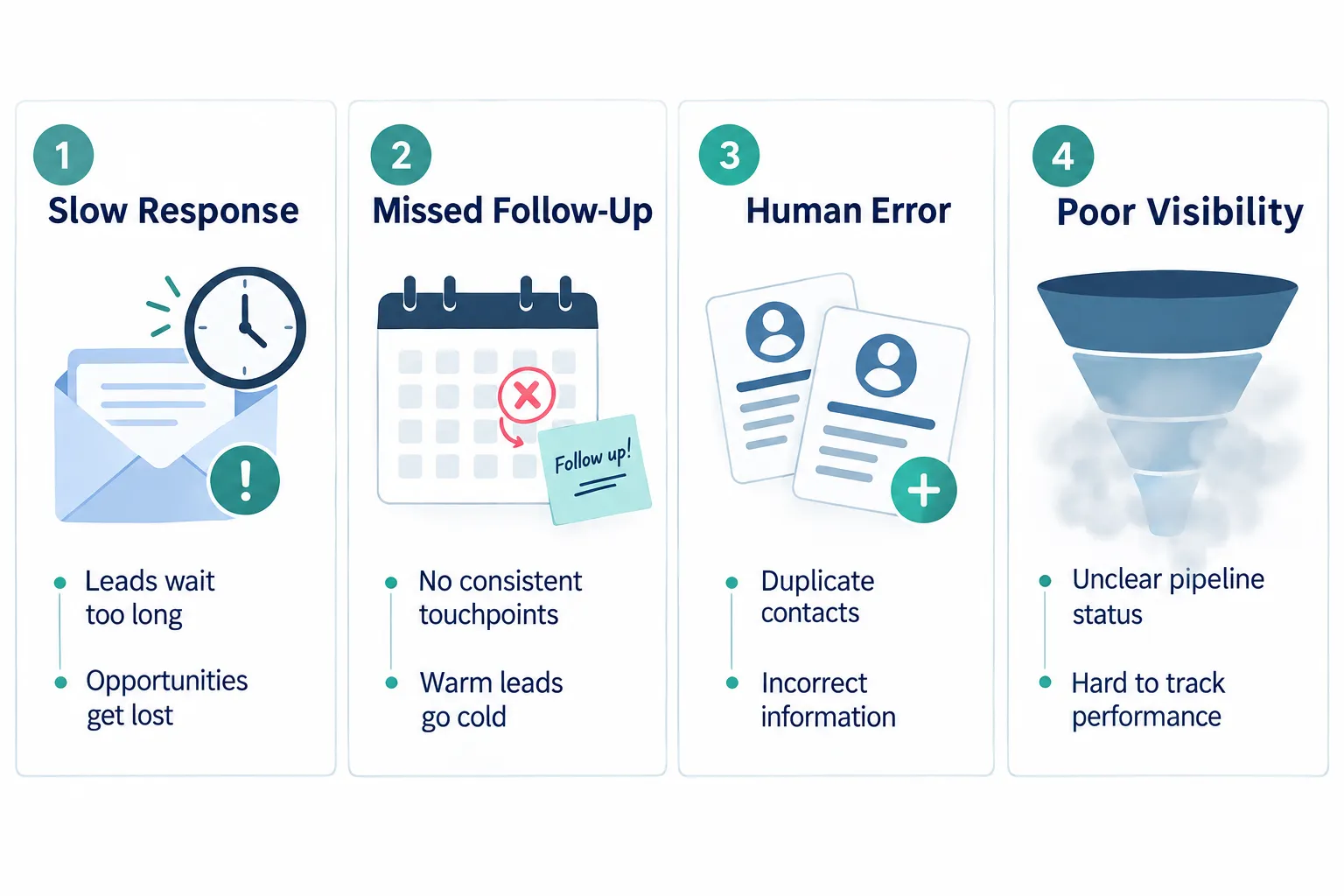
Here’s the full breakdown of where the cost of manual lead management actually hides:
| Cost category | What it looks like day to day |
|---|---|
| Employee time | Manually typing lead details into spreadsheets or CRMs after the fact |
| Slow response | Leads sit in an inbox or voicemail for hours or days before anyone notices |
| Missed follow-up | Prospects who didn’t answer the first call never get a second one |
| Human error | Wrong phone numbers, duplicate contacts, missed reminders |
| Poor visibility | Owners can’t tell how many leads are open, stalled, or lost |
| Opportunity cost | Salespeople spend hours on admin instead of talking to prospects |
Let’s walk through each one.
Employee time. Someone has to manually enter new leads, update statuses, and move information between tools. None of that time generates revenue directly. It just keeps the lights on.
Slow response. When a lead comes in through a form, email, or voicemail, someone has to physically notice it before anyone can respond. If that person is in a meeting, out sick, or just buried in other work, the lead waits. And waiting prospects start calling your competitors.
Missed follow-up. This is the most common manual sales process failure. A salesperson calls a lead once, doesn’t get through, and moves on to the next task. Without a system forcing a second, third, and fourth attempt, that lead quietly disappears from everyone’s radar.
Human error. Manual data entry creates duplicate records, wrong contact details, and missed tasks. A lead gets entered twice under slightly different spelling. A follow-up date gets written down wrong. A note that mattered gets lost because it lived in someone’s head, not in a shared system.
Poor visibility. When leads live in different inboxes, notebooks, and spreadsheets, nobody can see the whole picture. Owners can’t answer basic questions like “how many leads do we have in process right now?” or “which ones are about to go cold?”
Opportunity cost. This one is easy to overlook. Every hour your best salesperson spends updating a spreadsheet is an hour they’re not spending on the phone with a prospect who’s ready to buy.
A manual sales process doesn’t fail all at once. It fails one missed follow-up at a time, until you look up and realize you’ve lost leads you never even knew you had.
How Much Money Does Manual Lead Management Actually Cost Your Business?
The dollar cost of manual lead management is higher than most owners assume, because it’s spread across small, easy-to-ignore pockets of time rather than one obvious expense. A simple hypothetical calculation makes this clearer.

Let’s walk through an illustrative example. These numbers are assumptions for the purpose of demonstrating how small time costs add up, not a published industry statistic.
Assumptions for this example:
- A sales rep spends 20 minutes a day manually logging leads, updating spreadsheets, and tracking follow-up reminders.
- That rep works 5 days a week.
- The business has 3 people doing some version of this work (sales reps, an office manager, or the owner).
- The fully loaded hourly cost per person (wages plus overhead) is estimated at $30/hour for this example.
Here’s how that adds up:
- Per person, per day: 20 minutes
- Per person, per week: 100 minutes (about 1.7 hours)
- Per person, per month (4 weeks): about 6.7 hours
- Across 3 people, per month: about 20 hours
- At an estimated $30/hour: roughly $600 a month, or about $7,200 a year
That number doesn’t include the leads that went cold from a slow response, the follow-ups that never happened, or the deals lost because nobody noticed a lead had gone quiet. It’s only the visible cost: the time spent on manual data entry. The invisible costs, which we’ll cover next, are usually bigger.
Quick decision rule: if your team spends more than 15 minutes a day per person on lead admin tasks like data entry, status updates, or chasing down contact info, you’re likely losing more in missed opportunities than you are in labor hours.
Manual Lead Management vs. CRM Software: Which Is Better for Growing Businesses?
For most small businesses with more than a handful of leads a week, CRM software outperforms manual tracking because it removes the dependency on memory and manual entry. Manual lead management can work for very low lead volume, but it starts breaking down as soon as more than one person is involved in the process.
Here’s a direct comparison:
| Factor | Manual lead management | CRM software |
|---|---|---|
| Response speed | Depends on someone noticing the lead | Can trigger instant notifications or automated replies |
| Follow-up consistency | Depends on memory | Scheduled automatically |
| Data accuracy | Prone to duplicates and typos | Centralized, fewer duplicate entries |
| Visibility into pipeline | Scattered across tools | One place to see every lead’s status |
| Scalability | Breaks down as volume grows | Built to handle growth |
| Setup effort | Low upfront, high ongoing cost | Some setup time, lower ongoing cost |
Choose manual tracking if you’re getting fewer than five new leads a month, you’re the only person touching sales, and you have time to personally follow up on every single one without fail.
Choose a CRM if more than one person touches your sales process, you’re getting leads from multiple sources (website, phone, referrals, social media), or you’ve ever said “I think we lost track of that lead” in the past six months.
What Are the Most Common Mistakes When Managing Leads by Hand?
The most common manual lead management mistakes aren’t about laziness. They happen because manual systems rely on perfect memory and perfect timing, and no team has either, all the time.
Watch for these patterns:
- No single source of truth. Leads live in email, texts, a spreadsheet, and someone’s head, with no single place showing the full picture.
- No automatic reminders. Follow-up depends entirely on someone remembering to check a calendar or notebook.
- Inconsistent lead status labels. One rep writes “follow up,” another writes “call back,” and a third just leaves it blank. Nobody can run a clean report.
- Duplicate entries. The same lead gets entered twice because two people didn’t know someone else already logged it.
- No tracking of response time. Nobody measures how long it actually takes to respond to a new inquiry, so slow response goes unnoticed.
- Leads lost in handoffs. When a lead moves from marketing to sales, or from one rep to another, details get dropped.
Common mistake to avoid: assuming that because your team is “on top of it,” nothing is falling through the cracks. Without a system tracking every lead’s status, you can’t actually verify that claim.
How Do You Know If Your Sales Process Is Too Manual?
Your sales process is too manual if you can’t answer basic pipeline questions without digging through multiple tools, or if follow-up depends on someone’s personal memory instead of a scheduled system. This is the clearest sign of sales process inefficiency.
Ask yourself these questions:
- Can you tell, right now, how many leads are currently in your pipeline without opening three different tools?
- Do you know the average time it takes your team to respond to a new lead?
- Has a lead ever told you “I reached out weeks ago and never heard back”?
- Does your follow-up depend on a person remembering, or a system reminding them?
- If your best salesperson quit tomorrow, would you lose track of their open leads?
If you answered “no” or “not sure” to more than one of these, your sales process has outgrown manual tracking. This isn’t a sign of failure. It’s a normal stage of growth that most businesses hit once they pass a certain lead volume.
Can Spreadsheets Replace a Real CRM for Small Business Lead Management, and What’s the Best CRM for a Limited Budget?
Spreadsheets can track basic lead information, but they can’t automatically remind anyone to follow up, can’t send instant notifications, and can’t give you a clear view of your pipeline without manual updates. A real CRM for small business handles all three automatically.
Spreadsheets are fine for a short list of contacts you personally manage. They fall apart once:
- More than one person needs to update lead status.
- Leads come in from more than one source.
- You need automatic reminders instead of manual check-ins.
- You want to see conversion rates or pipeline stages without building a report by hand.
When it comes to choosing a CRM for small business with a limited budget, the right fit depends less on price and more on fit:
- Choose a simple CRM if you need basic contact tracking and reminders, and you have the time to set it up and maintain it yourself.
- Choose a done-for-you system if you don’t have the time, staff, or technical background to configure and maintain software on your own, and you’d rather have it built and implemented for your business from day one.
This is exactly the gap we built SalesHubHQ to close. We don’t just hand you login credentials and a tutorial video. We provide a complete done-for-you system with AI-powered lead capture and automated follow-up systems already configured for your business, so it’s ready from day one with no tech knowledge required on your end.
What Happens When Leads Fall Through the Cracks in Manual Systems?
When leads fall through the cracks, the business doesn’t usually find out right away. The lead simply stops responding, assumes you’re not interested or too slow, and moves on to a competitor who answered first.
Here’s the typical sequence:
- A lead reaches out with real interest.
- Nobody responds within a reasonable window.
- The lead either loses interest or finds another provider.
- The lead is never marked “lost” in any system, because there was no system tracking it in the first place.
- The business has no record that the opportunity ever existed.
This is why owners often feel like leads “just dried up” even when inquiry volume hasn’t changed. The leads are still coming in. They’re just leaking out the back of a manual sales process nobody can see clearly.
How to Transition From Manual to Automated Lead Management (and Save Time and Money)
The transition from manual to automated lead management works best when you treat it as building a repeatable process, not just installing new software. Buying a tool without changing the underlying process usually just creates a more expensive version of the same chaos.

Here’s a practical path:
- Map your current process. Write down every step a lead goes through today, from first contact to closed deal.
- Identify where leads currently get stuck or lost. Usually it’s the handoff points: between marketing and sales, or between first contact and follow-up.
- Set response time standards. Decide how fast a new lead should be contacted, and build a system that makes that standard automatic, not optional.
- Automate follow-up sequences. Instead of relying on memory, set scheduled follow-up touches that happen whether someone remembers or not.
- Centralize everything in one place. One system, one source of truth, visible to everyone who needs it.
- Review pipeline visibility weekly. A short weekly check-in on open leads catches problems before they become lost revenue.
This is where lead management automation earns its name. It’s not about replacing your salespeople. It’s about making sure every lead gets captured and nurtured automatically, so your team’s time goes toward closing deals instead of chasing data entry.
At SalesHubHQ, this is the whole point of our all-in-one platform. We build a predictable growth system around your business: we build the website and content, set up AI-powered capture on every channel, and configure automated nurture sequences, all built and implemented for your business so you get systems that actually work, not another login you have to figure out alone. We even include a free smart website built for you as part of the foundation, because lead capture starts before the first conversation ever happens.
Who Should Use Manual Lead Management, and Who Shouldn’t?
Manual lead management can work for solo operators with very low, predictable lead volume. It stops working once more than one person touches the sales process, or once lead volume grows past a few per week.
Manual tracking is reasonable if:
- You’re a solo operator handling fewer than five leads a month personally.
- You have no team members who need shared visibility.
- You have reliable time blocked every single day for follow-up, without exception.
Manual tracking is a liability if:
- More than one person is involved in sales or lead follow-up.
- You get leads from more than one channel (website, phone, referrals, ads).
- You’ve ever lost track of a lead and only noticed when the prospect mentioned it.
- You’re growing and expect lead volume to increase in the next six to twelve months.
Most businesses we work with in Metro Atlanta fall into that second group. They’re not small enough for manual tracking to be safe, and not large enough to have a dedicated marketing or ops team to manage a complex system. That middle zone is exactly where a done-for-you, all-in-one platform earns its keep.
What Are the Hidden Costs of Manual Lead Management That People Miss?
The hidden costs of manual lead management are the ones that never show up on a spreadsheet: lost trust, inconsistent customer experience, and the mental load on owners who feel like they have to personally double-check everything.
These are easy to overlook, but they add up:
- Inconsistent customer experience. One lead gets a fast, polished response. Another waits three days because the rep handling them was slammed. Prospects notice.
- Owner mental load. When there’s no system, the owner often becomes the fallback system, checking in on leads personally to make sure nothing slips. That’s time the owner isn’t spending on strategy or growth.
- Lost referral potential. A slow or inconsistent experience doesn’t just lose the sale. It lowers the odds that prospect refers you to someone else.
- Team frustration and turnover risk. Salespeople who spend half their day on admin work instead of selling tend to burn out faster and hit quota less often.
- Delayed growth decisions. Without clear visibility into pipeline and conversion, owners make growth decisions (hiring, marketing spend, expansion) based on gut feeling instead of real numbers.
None of these show up in a line-item budget. All of them affect the bottom line.
Frequently Asked Questions
Is manual lead management ever acceptable for a small business?
Yes, but only for very low lead volume handled by a single person with no team involvement. Once more than one person touches leads, manual tracking becomes risky.
What’s the biggest hidden cost of a manual sales process?
The biggest hidden cost is usually missed follow-up. Prospects who don’t get a second or third contact attempt quietly disappear, and most businesses never find out how many leads they lost this way.
How do I know if my business needs a CRM?
If you can’t answer “how many leads are in our pipeline right now” without checking multiple tools, or if you’ve ever lost track of a lead, you likely need a CRM for small business.
Can I just use a free spreadsheet template instead of a CRM?
A spreadsheet can track basic contact details, but it can’t send automatic reminders, trigger instant responses, or give real-time pipeline visibility. It works for very small, low-volume operations only.
How long does it take to move from manual tracking to an automated system?
With a done-for-you system, this can happen much faster than building it yourself, since the website, lead capture, and follow-up automation are configured and ready from day one instead of built from scratch.
Does automating lead management replace my sales team?
No. Automation handles capture, reminders, and nurture sequences so your team isn’t stuck on admin work. Your salespeople still close the deals, they just spend more time actually talking to prospects.
What size business benefits most from lead management automation?
Businesses with lean teams, multiple lead sources, and no dedicated marketing staff benefit the most, because automation replaces the manual effort that a bigger team would otherwise absorb.
How much does manual lead management typically cost per month?
It depends on team size and lead volume, but even a small team spending 20 minutes a day on manual admin tasks can add up to significant monthly labor cost, before factoring in lost or delayed leads. Use the calculator below for a rough estimate based on your own numbers.
Calculate What Manual Lead Management Is Really Costing Your Business
Numbers make this real. Use the quick calculator below to estimate your own monthly cost based on your team size and how much time they spend on manual lead tasks.

