
Automated Sales Process: How to Convert More Leads Faster

What Does a Sales Automation Workflow Actually Look Like Step by Step
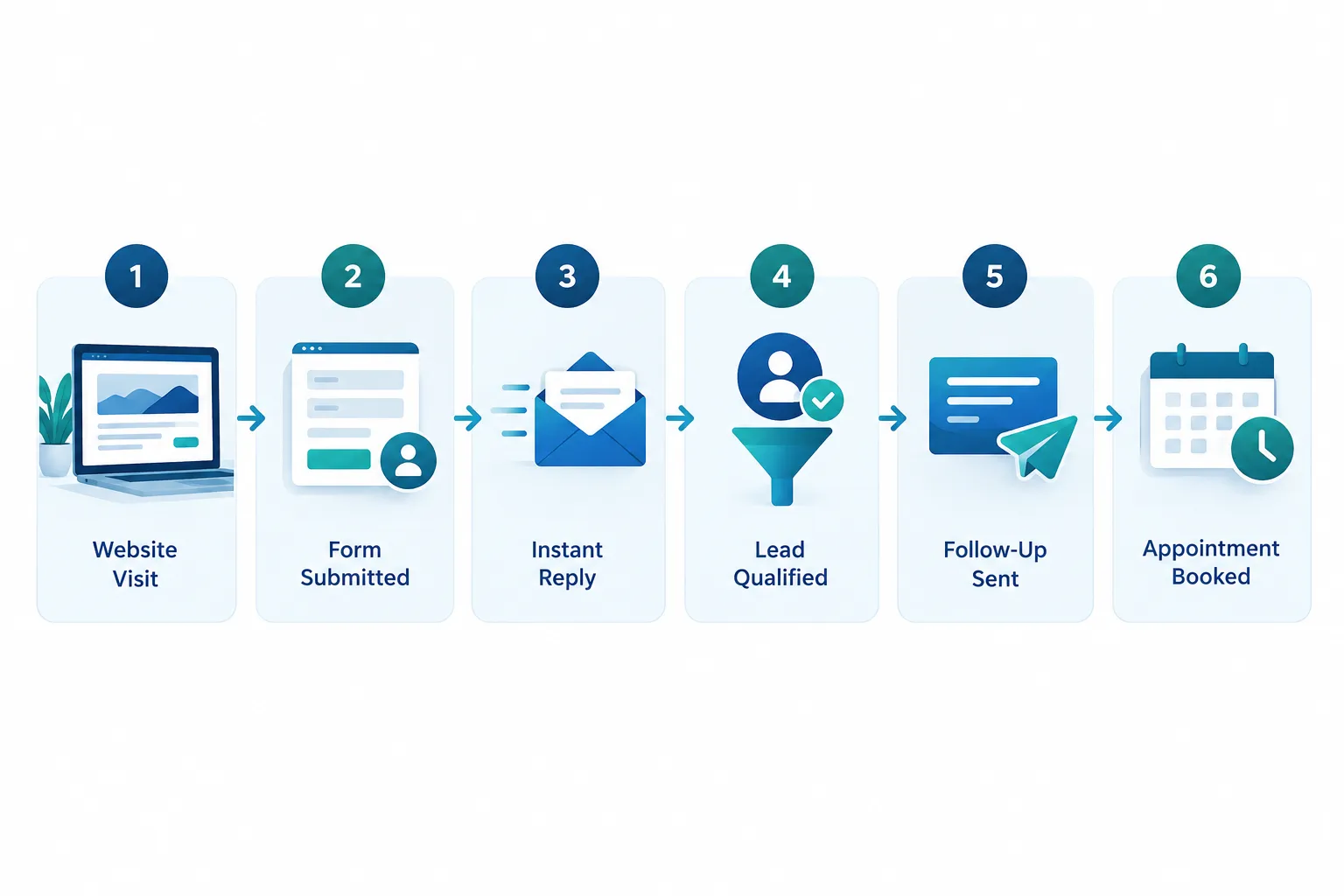
A sales automation workflow is a connected sequence of triggers and actions that moves a prospect from first contact to a booked appointment without anyone manually copying information between systems. Each step happens automatically based on what the lead does, and a person only gets involved once the lead is qualified and ready for a real conversation.
Here is what that sequence looks like in a real business:
- Discovery. A prospect finds your business through a Google search, a referral link, or a social post and lands on your website.
- Capture. They fill out a contact form, start a chat widget conversation, or request a quote. The moment they submit, their information flows straight into your CRM. No one has to check an inbox and copy it over.
- Instant response. Within seconds to a few minutes, the system sends a confirmation email or text acknowledging the inquiry. This alone prevents the number one reason leads go cold: silence.
- Qualification. The system asks a few smart questions, through a form, a chatbot, or a short automated email sequence, to figure out budget range, timeline, and fit. Leads that match your ideal customer profile get flagged as sales-ready.
- Relevant follow-up. Based on what the lead said or clicked, they receive content that matches their specific interest, not a generic newsletter blast.
- Booking. A calendar link lets the qualified lead pick a time directly, without the back-and-forth of “does Tuesday at 2 work for you?”
- Pipeline entry and handoff. The appointment lands on a rep’s calendar with full context already attached: what page they visited, what they asked, and what they already know.
- Human close. A real person runs the meeting, answers questions, handles objections, and closes the deal.
Example: A dental practice’s website chatbot asks a visitor whether they’re looking for a cleaning, a cosmetic consult, or emergency care. Based on the answer, the CRM automatically tags them, sends the right intake form, and books them with the correct provider’s calendar. No front desk staff member touched that lead until the confirmed appointment showed up on the schedule.
How Does Lead Scoring Work in Automated Sales Funnels
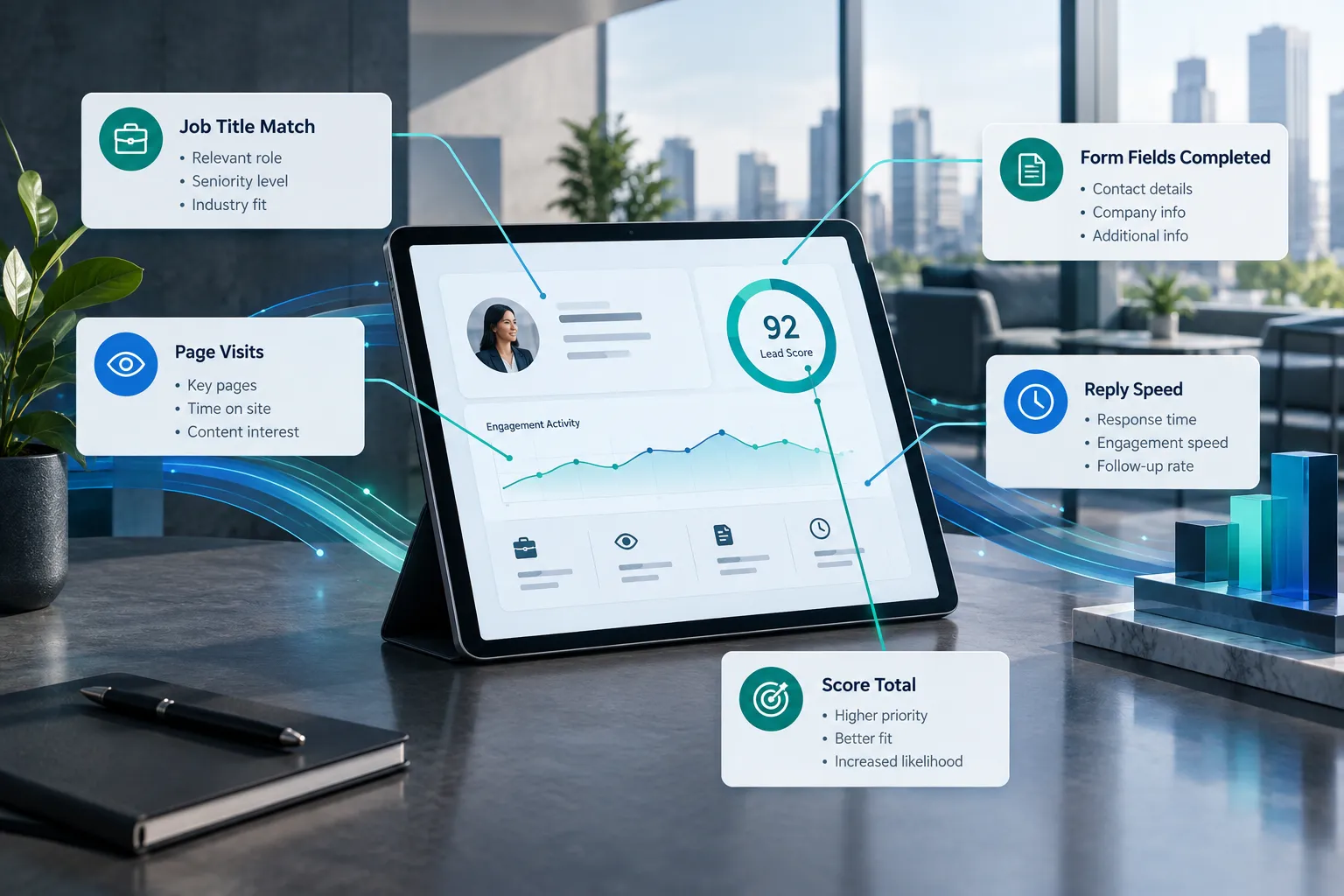
Lead scoring assigns a numeric value to each prospect based on how well they match your ideal customer and how engaged they are, so your team knows which leads to call first. A lead who visits your pricing page three times and downloads a case study scores higher than one who only viewed your homepage once.
Scoring typically combines two types of signals:
| Signal type | What it measures | Example |
|---|---|---|
| Fit | Does this lead match who you sell to | Company size, industry, job title, budget stated on a form |
| Intent | How engaged is this lead right now | Pages visited, emails opened, demo requested, reply speed |
- Choose a simple point system if you’re just starting out: add points for filling out a form, opening emails, or visiting a pricing page, and set a threshold that triggers a sales alert.
- Choose a weighted model if you have enough historical data to know which specific actions actually predict closed deals, not just general interest.
Common mistake: Scoring only on activity and ignoring fit. A prospect who opens every email but runs a company far too small to afford your service will still score high and waste your sales team’s time if fit isn’t part of the formula.
What’s the Difference Between Sales Automation and Marketing Automation
Marketing automation builds awareness and nurtures interest before someone is ready to talk to sales. Sales automation takes over once a lead has shown real buying intent and needs to move through qualification, scheduling, and pipeline management toward a decision.
Think of it as two connected but distinct jobs:
- Marketing automation: email newsletters, social content scheduling, ad retargeting, blog nurture sequences, lead magnets. Goal: turn strangers into interested prospects.
- Sales automation: CRM automation, lead routing, appointment scheduling, pipeline stage updates, follow-up reminders. Goal: turn interested prospects into customers.
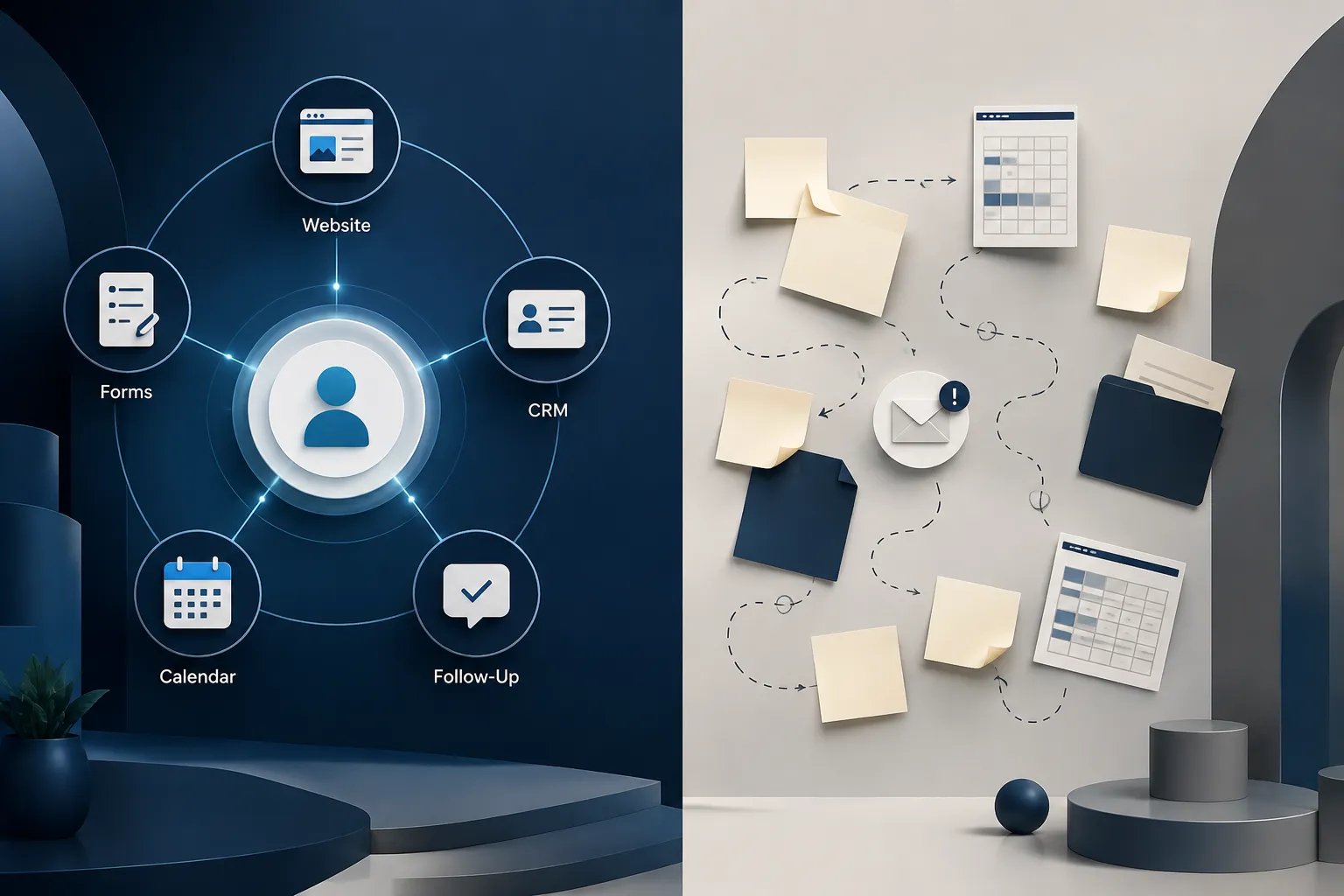
The two should share the same data. If your marketing automation tool doesn’t talk to your CRM, your sales team ends up working from a different picture of the customer than your marketing team built. This is one of the most common gaps we see in small businesses: two good systems that never learned to speak to each other.
Can Small Businesses Really Automate Their Entire Sales Process
Small businesses can automate the majority of a sales process, but not all of it, and that’s actually the right outcome, not a limitation. The parts that repeat the same way every time (capture, response, qualification, scheduling, reminders, reporting) automate well. The parts that require judgment, trust-building, and negotiation still need a person.

A realistic target for a business with 5 to 100 employees:
- Lead capture and CRM entry: fully automatable
- Initial response: fully automatable
- Basic qualification: mostly automatable
- Nurture follow-up: mostly automatable
- Appointment scheduling: fully automatable
- Discovery calls and closing: human-led, automation-supported
Decision rule: if a task involves reading a room, adjusting tone based on someone’s reaction, or negotiating terms, keep a human on it. If it involves sending the same information to everyone who takes the same action, automate it.
What CRM Features Do I Need for Sales Automation
At minimum, you need a CRM that captures leads automatically, tracks every interaction in one place, triggers follow-up sequences based on behavior, and connects to your calendar and website. Without these four things, you’re still doing manual work that a system should be doing.
Look for:
- Automatic lead capture from web forms, chat, and email so nothing gets typed in by hand
- Workflow automation that triggers emails, tasks, or alerts based on what a lead does
- Pipeline visibility showing exactly where every lead sits and how long they’ve been there
- System integration with your website, email, calendar, and invoicing tools
- Reporting that shows response time, conversion rate by stage, and where leads stall
Edge case: if your business runs on referrals and repeat relationships more than cold inbound leads, you need less scoring complexity and more relationship-tracking features: notes, reminders, and touchpoint history matter more than lead scoring formulas.
How Much Does Sales Automation Software Cost for Small Teams
Sales automation for small teams typically costs less than one part-time salary per month once you account for the CRM platform, automation workflows, and any integration work. Costs scale with the number of users and the complexity of the workflows you build, not just the software license itself.
Budget factors to weigh:
- Per-user CRM licensing, which usually scales with your team size
- Setup and workflow-building time, either done in-house or through a partner
- Integration work to connect your CRM to your website, calendar, and other software
- Ongoing adjustments as your sales process changes
Choose a lean setup if you’re a five- to ten-person team with a simple, single-product sales cycle. Choose a more built-out system if you sell multiple products or services with different qualification paths, because you’ll need more workflow logic to route leads correctly.
What Happens When Automation Fails to Convert a Lead
Automation fails to convert a lead when the workflow stalls out, the follow-up feels robotic, or a step depends on a human action that never happens. The fix is almost always a broken handoff, not a broken tool.
Common failure points:
- The handoff drops. A lead gets marked “qualified” but no alert reaches a salesperson, so it sits untouched.
- The messaging feels generic. Automated emails that ignore what the lead actually asked about read as spam, and people disengage.
- No exit ramp exists. The lead wants to talk to a person immediately, but there’s no visible way to skip the sequence and reach one.
- Data doesn’t sync. A lead fills out two different forms on two different tools that don’t talk to each other, so your team follows up twice, or not at all.
Common mistake: treating an automated sequence as “set it and forget it.” Automated workflows still need someone checking conversion rates monthly and adjusting message timing, subject lines, and qualification questions based on what’s actually working.
Is Sales Automation Better Than Hiring a Sales Rep
Sales automation and a sales rep solve different problems, and the strongest setups use both together rather than choosing one over the other. Automation handles volume, consistency, and speed. A rep handles trust, negotiation, and judgment calls that no workflow can replicate.
- Choose automation-first if your bottleneck is response time, forgotten follow-up, or inconsistent qualification, since these are process problems, not people problems.
- Choose to hire if your bottleneck is a lack of anyone available to run discovery calls or close deals, since automation cannot hold a sales conversation.
- Do both if you’re generating inquiries faster than your team can respond to them manually. Automation buys your rep back hours every week to spend on actual conversations instead of data entry and chasing replies.
What’s the Best Sales Automation Tool for B2B vs B2C
The best tool depends on deal complexity and volume: B2B sales automation needs stronger pipeline and account tracking, while B2C sales automation needs faster, higher-volume nurture and scheduling. There is no single best tool across both worlds; the right choice matches your sales cycle length.
| Factor | B2B needs | B2C needs |
|---|---|---|
| Deal cycle | Weeks to months, multiple decision-makers | Minutes to days, one decision-maker |
| Key automation focus | Lead scoring, account-based routing, proposal follow-up | Instant response, scheduling, cart or inquiry recovery |
| CRM depth needed | Detailed pipeline stages, notes, task history | Fast capture, simple stages, high-volume nurture |
Example: a commercial equipment dealer selling to businesses needs a CRM with strong pipeline stages and follow-up tasks tied to specific decision-makers. A home services company booking same-week appointments needs speed and scheduling automation far more than deep pipeline tracking.
How Do You Set Up Lead Nurturing Automation From Scratch
Setting up lead nurturing from scratch starts with mapping the questions your prospects ask before they buy, then building short automated sequences that answer those questions in order. You don’t need dozens of emails. You need the right five or six, sent at the right time.
Steps to build it:
- List the top three objections or questions that come up before someone buys.
- Write one short piece of content per objection: an email, a short video, or a one-page guide.
- Sequence them by urgency, sending the most decision-critical content first if the lead hasn’t responded.
- Set trigger rules, such as “if no reply after three days, send the next email” or “if they click the pricing link, notify sales immediately.”
- Test response rates monthly and cut anything that isn’t getting opened or clicked.
Common mistake: writing nurture emails that sound like a newsletter instead of a conversation. Short, direct, and personal outperforms polished and generic almost every time.
What Common Mistakes Do People Make When Automating Sales
The most common mistake is automating a broken process instead of fixing it first. Automation speeds up whatever process you feed it, including the parts that don’t work.
Other frequent mistakes:
- Automating too much too fast. Trying to build twenty workflows in month one usually means none of them get tested properly.
- No clear handoff point. Leads move through automation but nobody defines exactly when a human takes over.
- Ignoring the data. The CRM tracks everything, but no one looks at the reports to see where leads actually stall.
- Skipping the human check. Every automated message goes out untested, and typos or broken links reach real prospects.
- Confusing automation with neglect. Once it’s built, some businesses assume they’re done. Workflows need review every few months as your offers and audience shift.
Can You Automate the Closing Stage or Just Lead Qualification
You can automate everything up to and including scheduling the sales conversation, but the actual close, the point where someone commits to buying, works best with a real person involved. This is the most important distinction in the entire process: automating repetitive tasks is not the same as automating a relationship.
Here’s where the line sits in practice:
- Automate: capturing the lead, sending the first response, qualifying budget and timeline, sending relevant follow-up, booking the meeting, sending reminders, updating the pipeline stage, sending the contract for signature after verbal agreement.
- Keep human: the discovery conversation, answering unique objections, negotiating price or scope, reading hesitation in someone’s voice or tone, and the final “yes.”
“Automation should remove the parts of selling that don’t require a person. It should never remove the person from the parts that do.”
A business that tries to automate the actual sale, sending contracts or pricing without a conversation, usually sees lower close rates, because buyers making a real financial decision want to know a person stands behind it.
How Long Does It Take to See Results From Sales Process Automation
Most small businesses see measurable improvement in response time and lead follow-through within the first 30 to 60 days of a properly built automated sales process, with full pipeline and conversion improvements showing up over two to three months as workflows get tuned. Speed of setup depends on how many systems need to connect and how much existing data needs cleanup.
Rough timeline for a typical small business:
- Weeks 1 to 2: CRM setup, website and form integration, initial workflow build
- Weeks 3 to 4: First automated sequences go live, team trained on handoff process
- Month 2: First real data on response times and lead stall points
- Month 3 and beyond: Workflow adjustments based on actual conversion data
Edge case: if your data is scattered across spreadsheets, old CRMs, and personal inboxes, add two to four weeks for cleanup before automation can run reliably.
What Industries Benefit Most from Automated Sales Funnels
Industries with a steady flow of inbound inquiries and a defined follow-up process benefit most, because automation multiplies the value of every lead that already comes in. Businesses with very low lead volume or highly custom, relationship-only sales gain less from heavy automation and more from lighter-touch CRM tracking.
Strong fits include:
- Professional services (accounting, legal, consulting) where response speed and consistent intake questions matter
- Healthcare and dental practices booking appointments from a steady stream of inquiries
- Automotive dealerships managing high lead volume across multiple vehicles and offers
- Home services and contractors where fast response often decides who wins the job
- B2B service companies generating inquiries through a website or referral network but still logging leads by hand
Example: a CPA firm that used to lose track of tax-season inquiries in a shared inbox now routes every inquiry into a CRM automatically, sends an instant acknowledgment, and books a discovery call without a staff member ever touching the calendar back-and-forth.
What a Connected Sales and Marketing System Looks Like in Practice
A connected system means your website, lead capture forms, CRM, follow-up sequences, and appointment booking all run off the same data, so nothing gets re-typed, forgotten, or handled twice. This is the difference between “we have some automation tools” and “we have an automated sales process.”
SalesHubHQ is one example of what this looks like when it’s built as one connected system rather than a pile of separate tools. Websites, lead capture, CRM automation, AI-assisted follow-up, scheduling, and pipeline management work together, so a lead that fills out a form on Monday can be qualified, nurtured, and booked by Wednesday without anyone manually shuffling information between five different logins. For a small business team already stretched thin, that kind of system integration is what turns “we should really follow up on that lead” into something that just happens.
The goal isn’t to add more software. It’s to reduce manual work, cut down on leads falling through the cracks, and free your team to spend time on the conversations that actually close business.

