
Automated Sales Process: A Powerful Guide to Every Stage

What Does an Automated Sales Process Actually Do
An automated sales process takes the manual, repetitive parts of turning a stranger into a customer and runs them automatically, in the background, every single time. It doesn’t sell for you. It makes sure no lead sits untouched, no follow-up gets forgotten, and every prospect gets the same fast, consistent experience.
Here’s the honest version of what most small businesses deal with before they automate anything:
- A lead fills out a form on Friday afternoon and doesn’t hear back until Monday.
- A promising prospect gets a callback logged in a notebook that never gets opened again.
- Three different team members follow up with the same lead, or nobody does.
- Customer details live in an inbox, a spreadsheet, and someone’s phone contacts, never in one place.
We hear versions of this every week from small business owners in Metro Atlanta. It’s not a discipline problem. It’s a systems problem. A person can’t manually track fifty leads at different stages and remember to follow up with each one on time. Software can.
Automation fixes this by doing four things without anyone having to remember to do them:
- Captures the lead the moment they show interest.
- Responds immediately, even outside business hours.
- Sorts leads by how qualified and ready-to-buy they are.
- Keeps following up automatically until the lead books a call or opts out.
How Does Lead Automation Work Step by Step: One Lead’s Journey From Click to Customer
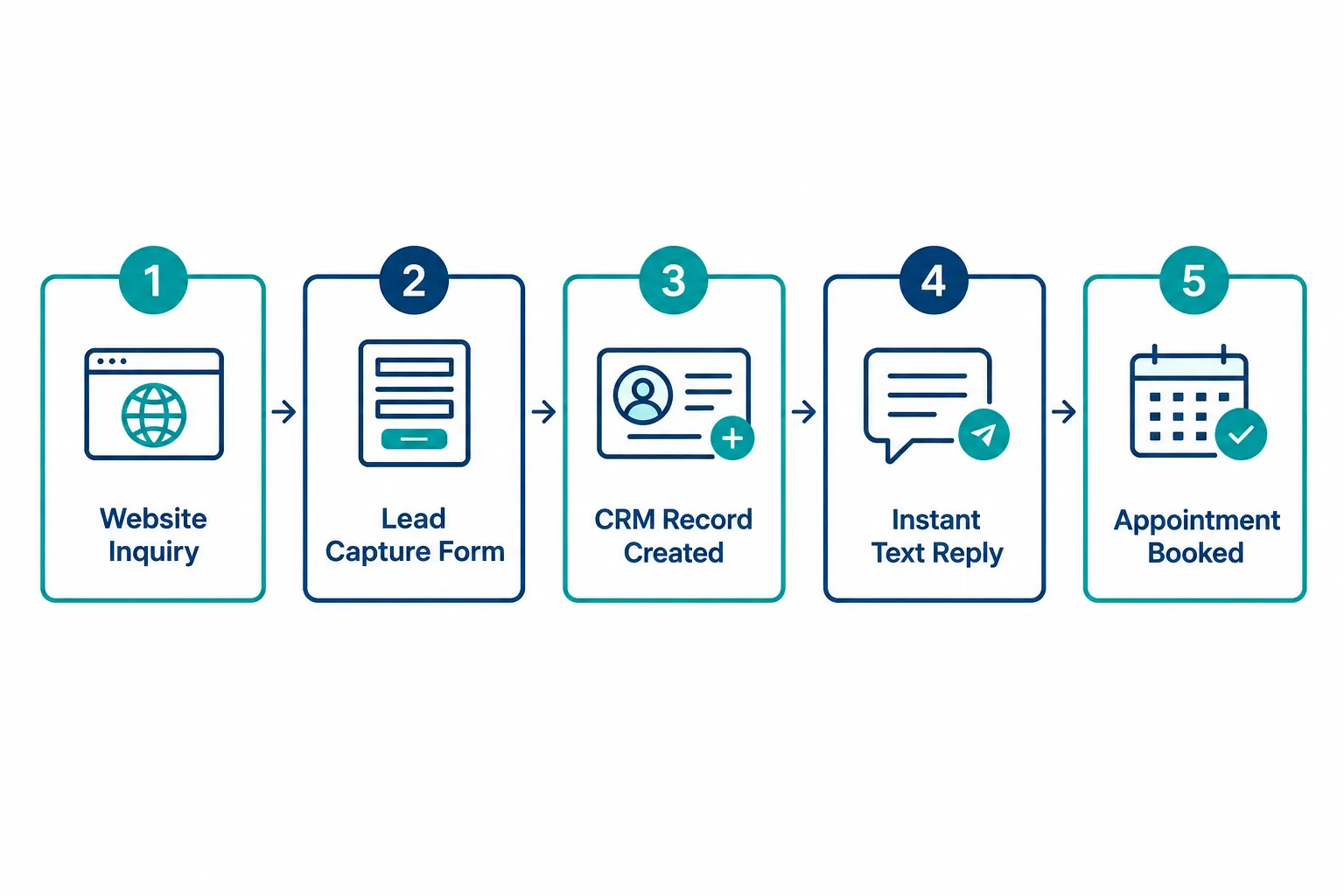
Lead automation works by connecting every stage of the buyer’s journey: first contact, data capture, response, qualification, follow-up, and appointment, so each stage triggers the next one without a person having to push it forward manually. Here’s what that looks like with a real, realistic example.
Meet “Dana.” She owns a small commercial cleaning company and needs a new janitorial contract manager. She searches “commercial cleaning services Atlanta” on a Tuesday at 9:40 p.m.
Stage 1: Website, Ad, or Search
Dana clicks a Google ad and lands on a landing page with a short quote request form. This is the entry point into the automated sales funnel; no automation happens yet, but everything downstream depends on this page being clear and easy to complete.
Stage 2: Lead Capture
Dana fills out the form: name, phone, email, and one qualifying question (“How many square feet does your facility have?”). The form submits instantly into the CRM. No one has to retype anything. This is AI-powered lead capture doing its job, collecting the right information the first time.
Stage 3: CRM Automation Creates the Record
The CRM automatically creates a new contact record for Dana, tags her by source (Google Ad), and assigns her to the correct pipeline stage: “New Lead.” This is CRM automation at work, organizing the data so nothing gets lost between the form and the sales team.
Stage 4: Immediate Response
Within seconds, Dana gets a text and an email confirming her request and letting her know someone will follow up shortly. At 9:41 p.m., this matters. A prospect looking at three competitors will often go with whoever responds first, and automated follow-up systems mean that response happens even after hours, on weekends, or during a busy Tuesday.
Stage 5: Qualification
The system sends a short automated follow-up: “Are you looking to switch cleaning providers in the next 30 days?” Dana answers yes. That single answer moves her from “New Lead” to “Qualified” in the pipeline automatically, and it flags her for the sales team as a priority.
Stage 6: Follow-Up
If Dana doesn’t answer right away, the automated follow-up sequence kicks in, a text the next morning, an email two days later, maybe a short case study on day four. No one on the team has to remember to send these. The system does it on schedule, every time, for every lead.
Stage 7: Appointment Booking
Once Dana confirms she’s interested, she gets a link to book a call on the sales rep’s calendar. She picks a time. The appointment auto-populates in the rep’s calendar and triggers a reminder text the day before, cutting down on no-shows.
Stage 8: Sales Conversation
Here’s where automation stops and a real person takes over. The sales rep gets on the call already knowing Dana’s building size, her timeline, and her answers to the qualifying questions. That’s the difference automation makes: the rep spends the call actually selling, not asking basic intake questions they could have gotten from a form.
Stage 9: Customer
Dana signs the contract. The CRM updates her status to “Customer” automatically, which can trigger a welcome email, an internal notification to the operations team, and the start of an onboarding sequence.
That’s the full lead-to-customer process. Every step before the sales conversation is automated. The conversation itself, and the decision to close, stays entirely human.
What Should Be Automated, and What Should Stay Human?
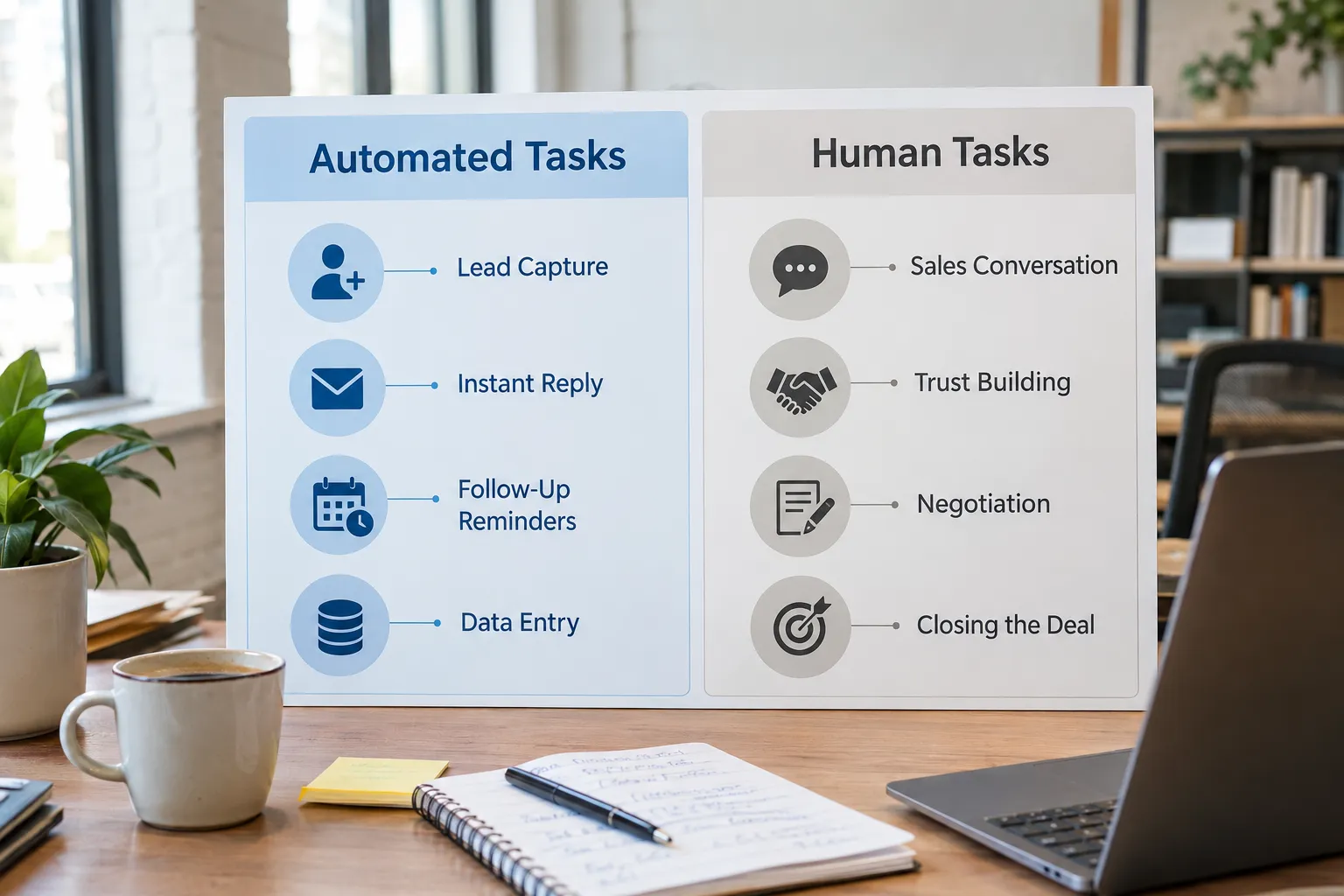
Automation should handle anything repetitive, time-sensitive, or purely administrative. Anything involving judgment, trust-building, or negotiation should stay with a real person. Getting this line wrong is the single biggest reason automation projects feel “robotic” instead of helpful.
Here’s a practical breakdown:
| Task | Automate It | Keep It Human |
|---|---|---|
| First response to a new lead | Yes | |
| Qualifying questions (budget, timeline) | Yes | |
| Appointment scheduling and reminders | Yes | |
| Data entry into the CRM | Yes | |
| Follow-up on cold leads | Yes | |
| Answering specific pricing or scope questions | Yes | |
| Handling objections | Yes | |
| Negotiating terms | Yes | |
| Building trust and rapport | Yes | |
| The actual close | Yes |
Decision rule: if a task involves repeating the same words or steps for every lead, automate it. If a task requires reading the room, changing your approach based on someone’s tone, or making a judgment call, it stays with a person.
A common mistake is trying to automate the sales conversation itself, sending a bot to answer detailed pricing questions or using canned messages that clearly aren’t personal once a lead is genuinely engaged. That’s where automation should hand off to a human, not take over completely.
What’s the Difference Between Sales Automation and CRM Automation?
CRM automation is the set of rules that run inside your customer database, things like updating a record, moving a deal to a new stage, or assigning a lead to a rep. Sales automation is the broader term for everything that moves a prospect through the pipeline, including tools outside the CRM like text messages, email sequences, and appointment booking.
Think of it this way: the CRM is the filing cabinet. CRM automation is the filing cabinet that files things itself. Sales automation is the whole system, including the front door (lead capture), the receptionist (instant response), and the calendar (appointment booking), all connected to that filing cabinet.
Most small businesses need both, working together. A CRM without automation is just a place where data goes to sit. Automation without a CRM has nowhere to store what it learns about each lead.
What’s the Difference Between Sales Automation and Email Marketing Automation?
Email marketing automation sends scheduled content to a list, usually based on time or broad segments. Sales process automation is triggered by an individual lead’s specific behavior and moves them through actual sales stages, not just an email calendar.
Here’s the practical difference:
- Email marketing automation might send a newsletter every Tuesday to everyone on a list, or a drip sequence to anyone who downloads a guide.
- Sales automation responds to what one specific person does- filling out a form, answering a qualifying question, missing a call- and adjusts the next action for that individual lead.
Email marketing automation is one tool that can support sales automation, but it’s not the whole system. A small business that only has email automation is missing instant response, qualification, and appointment booking, the pieces that actually move someone toward becoming a customer.
Do You Need CRM Automation If You’re Just Starting?
Yes, even a small or early-stage business benefits from CRM automation, because the alternative, tracking leads in a spreadsheet or your inbox, breaks down the moment you have more than a handful of active prospects. You don’t need the most complex system available. You need one that fits your current lead volume and can grow with you.
Here’s how to know if you’re ready:
- You’ve had a lead slip through the cracks because no one followed up.
- You’re not sure how many active prospects you actually have right now.
- Two people on your team have both reached out to the same lead, or neither did.
- You can’t say with confidence where each deal stands in your pipeline.
If any of that sounds familiar, CRM automation isn’t a “someday” project. It’s something that pays for itself the first month you stop losing leads to bad tracking.
How Do You Know If Your Sales Process Needs Automation?
Your sales process needs automation if leads are going cold before anyone follows up, if your team spends more time on data entry and reminders than actual selling, or if you can’t answer basic questions about your pipeline without digging through multiple tools.
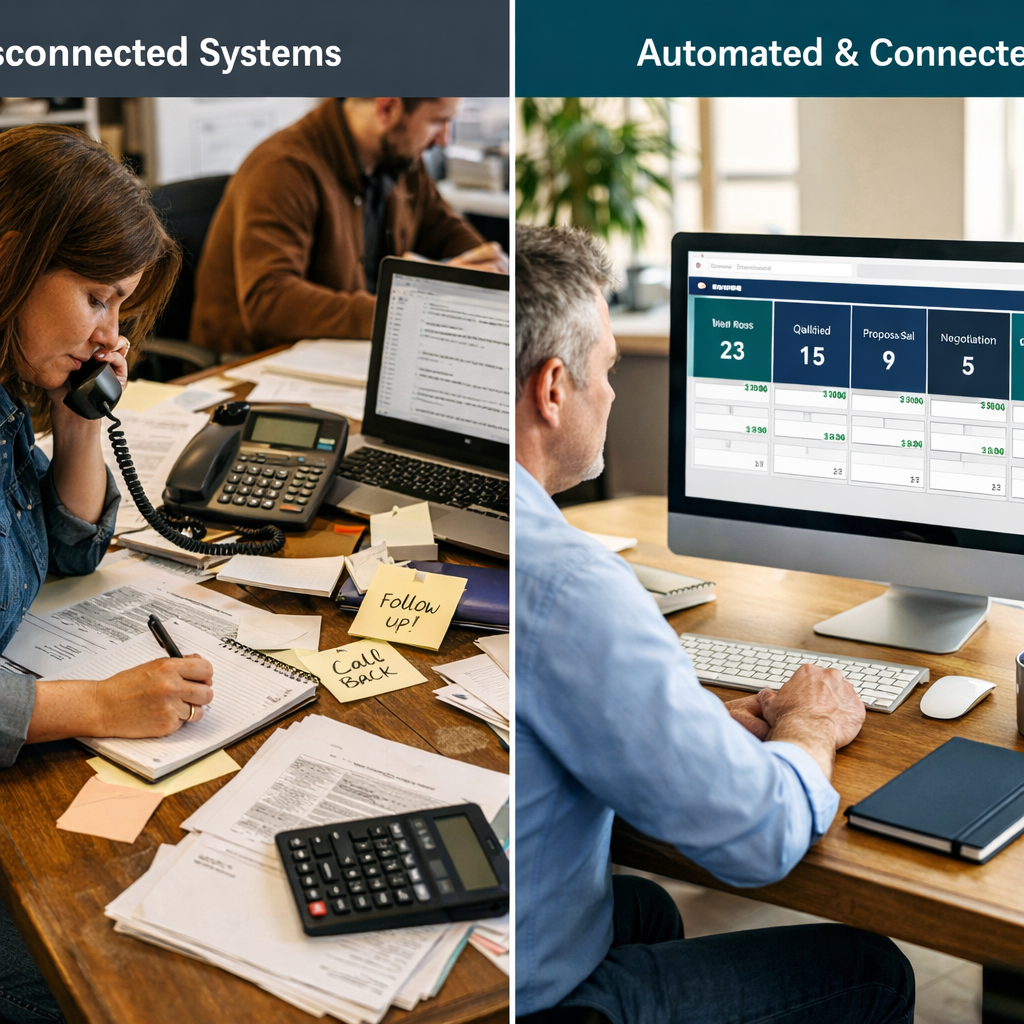
Common warning signs include:
- Response times to new leads measured in hours or days, not minutes.
- Follow-up depends on someone remembering to do it manually.
- Customer information is spread across email, texts, spreadsheets, and sticky notes.
- Your team can’t tell you how many leads are currently in each stage of the pipeline.
- You’re growing lead volume but not growing your close rate, because leads aren’t getting proper follow-up.
Quick example: if you generate 20 leads a month and close 2, but you suspect several of the other 18 simply never got a timely follow-up, that’s not a lead quality problem, it’s a process problem automation is built to solve.
What Happens When Sales Automation Goes Wrong?
Sales automation goes wrong when it’s built without a clear plan for the human handoff, when messages sound robotic, or when too many disconnected tools are stitched together instead of working as one system. The result is usually leads who feel spammed, ignored, or confused about who they’re even talking to.
The most common mistakes we see:
- Automating too much of the conversation. Sending generic, templated messages after a lead has already shown real interest and expects a real response.
- No clear handoff point. The system keeps sending automated follow-ups even after a lead has already talked to a salesperson, creating confusing, duplicate messages.
- Too many disconnected tools. A form tool that doesn’t talk to the CRM, a CRM that doesn’t talk to the calendar, and a calendar that doesn’t talk to email. Each gap is a place a lead can fall through.
- Setting it and forgetting it. No one reviews how leads are actually responding to the sequences, so a broken step (a bad link, a confusing message) can run for months unnoticed.
- Skipping the qualifying step. Sending every single lead straight to a salesperson’s calendar, even totally unqualified ones, wastes the sales team’s time and defeats the purpose of automating in the first place.
Edge case: if your business has very low lead volume (fewer than 10-15 leads a month) and a very long, relationship-driven sales cycle, heavy automation can feel impersonal if it’s not tuned carefully. In that case, lighter-touch automation, fast response and reminders, but fewer automated messages overall, usually works better.
How Much Does Sales Automation Software Cost for Small Business?
Sales automation software for small businesses typically ranges from a basic CRM plan with limited automation up to a full all-in-one platform that includes lead capture, CRM, follow-up automation, and appointment booking in one system. Costs vary widely depending on how many separate tools you’re trying to replace versus how many you’re trying to connect.
Rather than quoting numbers that shift constantly by vendor and plan, here’s how to think about the real cost:
- Piecing together separate tools (a form builder, a CRM, an email platform, a scheduling app, a texting service) usually costs more in total and takes more time to manage, because you’re paying for and maintaining several subscriptions.
- An all-in-one platform consolidates those functions, which often reduces total software spend and, more importantly, reduces the hours spent making tools talk to each other.
- The higher cost most businesses underestimate isn’t the software; it’s the setup time. A tool that isn’t configured correctly for your specific sales process doesn’t save you money even if the subscription is cheap.
Decision rule: if you’re already paying for three or more separate tools that don’t sync with each other, consolidating into one connected platform is usually the more cost-effective path, even if the sticker price looks higher at first glance.
Best Sales Automation Tools for Small Teams
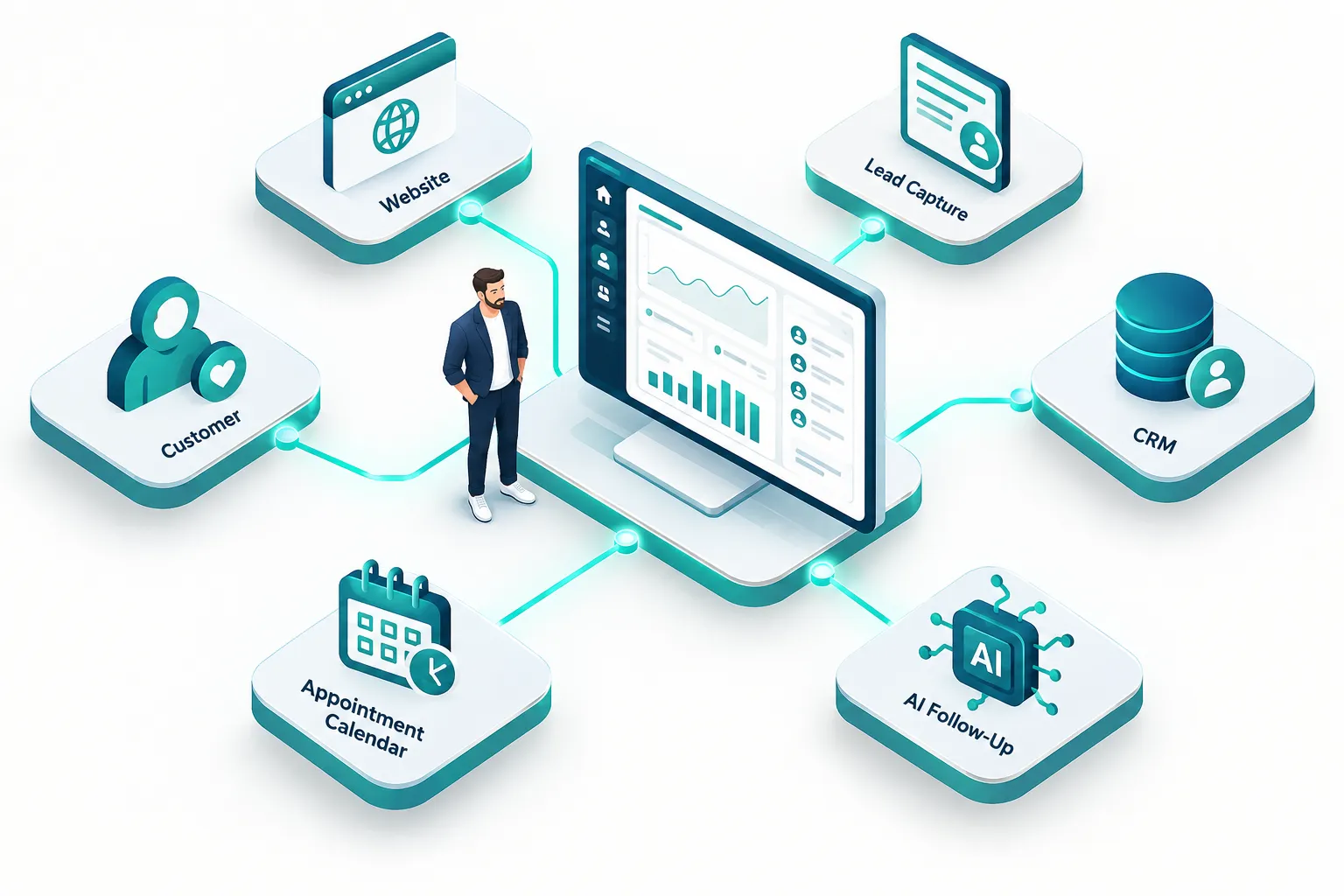
The best sales automation setup for a small team is the one that combines lead capture, CRM, follow-up, and scheduling into a single connected system rather than several separate tools that need manual syncing. For a lean team without a dedicated marketing person, fewer tools that work together beat more tools that don’t.
What to look for:
- Built-in lead capture (forms, chat, or landing pages) that flows directly into the CRM without manual entry.
- Automated follow-up by text and email, not just email alone, since text response rates tend to be faster.
- Integrated appointment scheduling so booked calls land directly on the sales rep’s calendar.
- A visual pipeline so anyone on the team can see where every lead stands at a glance.
- Simple reporting that shows response times, lead sources, and conversion rates without needing a data analyst to interpret it.
Choose a consolidated, all-in-one platform if you have a lean team, no dedicated marketing staff, and limited time to manage multiple software logins. Choose a collection of specialized tools only if you have someone whose job it is to keep them connected and maintained.
How Long Does It Take to Set Up an Automated Sales Funnel?
Setting up a basic automated sales funnel for a small business typically takes two to six weeks, depending on how much of your current process needs to be rebuilt versus simply connected. A business starting from scratch with no CRM will take longer than one that just needs its existing tools connected properly.
Here’s a realistic breakdown:
- Week 1: Map the current process, where leads come from, what happens to them today, and where they get lost.
- Weeks 1-2: Build or connect the lead capture forms, website, and CRM so information flows automatically.
- Weeks 2-3: Write and set up the automated follow-up sequences (text and email) and qualifying questions.
- Weeks 3-4: Connect the appointment calendar and test the full flow with sample leads.
- Weeks 4-6: Train the team on the handoff point, when automation stops and a human takes over, and adjust based on real leads coming through.
Common mistake: trying to automate everything on day one instead of starting with the highest-impact piece first, usually instant lead response, and building out from there.
Is Sales Automation Worth It for Small Business?
Sales automation is worth it for most small businesses that generate more than a handful of leads a month and struggle with consistent, timely follow-up. It’s less necessary for businesses with extremely low lead volume or a sales process built entirely on long-term personal relationships with a small, known set of clients.
Automation tends to pay off fastest when:
- Leads currently wait hours or days for a first response.
- Your team is spending significant time on manual data entry and reminders.
- You’ve lost deals in the past simply because follow-up didn’t happen.
- You’re trying to grow lead volume but don’t have the staff to manually manage more prospects.
It’s a lower priority right now if you have very few leads, a highly relationship-based sales model with a tight-knit client base, or if your team already has a reliable manual process that isn’t causing missed opportunities. Even then, basic automation for instant response and reminders is usually still worth having.
Bring It All Together: How SalesHubHQ Builds This For You
Everything described above- lead capture, CRM, instant response, qualification, follow-up, and appointment booking- works best as one connected system, not five separate tools you’re trying to manage yourself. That’s exactly what we build at SalesHubHQ.
We know most small business owners in the Atlanta area didn’t get into business to become software administrators. You run a service company or a B2B firm. You don’t have a marketing department, and you don’t have time to learn four different platforms and figure out how to connect them yourself.
That’s why we built a complete done-for-you system. Here’s what that actually includes:
- A free smart website built for you, ready from day one, designed to capture leads instead of just sitting there.
- AI-powered lead capture so every visitor who shows interest gets turned into a tracked, organized lead automatically.
- CRM automation that keeps every prospect’s information, status, and history in one place, with no tech knowledge required to use it.
- Automated follow-up systems by text and email, so leads are captured and nurtured automatically, even after hours or on weekends.
- Integrated appointment booking that puts qualified prospects directly on your calendar.
- An all-in-one platform that replaces the patchwork of disconnected tools most small businesses have been stitching together for years.
We build the website and content, we set up the automation, and we hand you a predictable growth system that’s working before your first coffee tomorrow morning. This isn’t a DIY toolkit you figure out on your own. It’s systems that actually work, built and implemented for your business, so you can spend your time on the sales conversations that actually close deals.

