
The Hidden Mistakes Costing Small Businesses New Deals
Why Do Potential Customers Leave My Website Without Buying
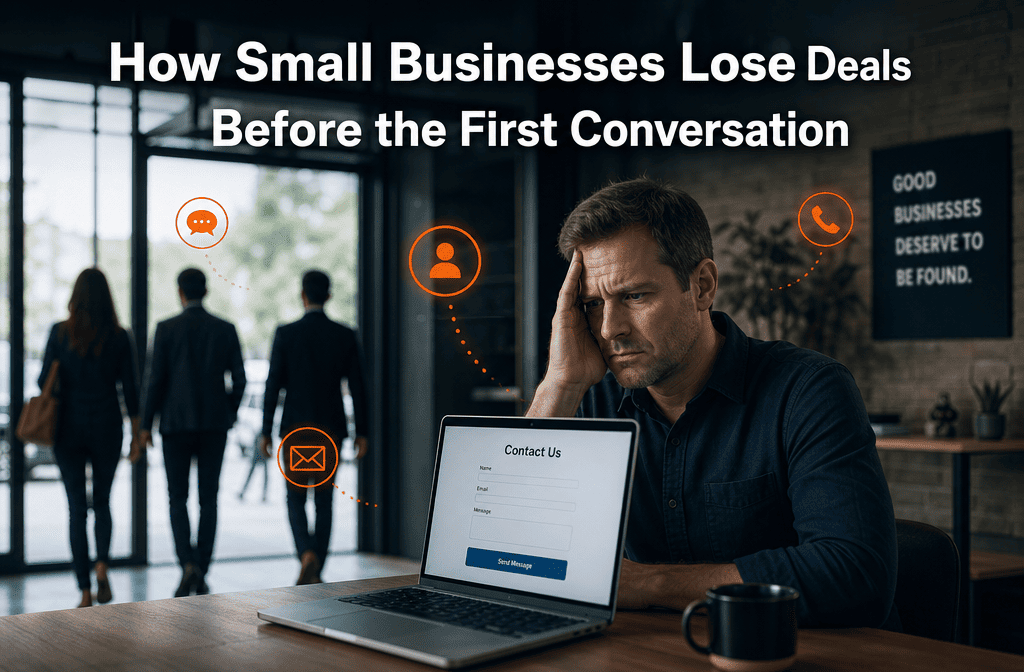
Your potential customers leave your website without buying because they can’t quickly understand what you do, how you help them, or why they should choose you over competitors. Within eight seconds of landing on your site, visitors decide whether to stay or leave. If your message isn’t crystal clear, they’re gone.
We see this pattern constantly with small businesses. A prospect searches for your services, finds your website, and immediately feels confused or uncertain. Maybe your headline is vague, your services aren’t clearly explained, or your pricing seems hidden. Instead of working to figure it out, they simply click back and try the next business.
The most common reasons prospects leave immediately:
- Unclear value proposition – They can’t tell what makes you different or better
- Confusing navigation – Finding information requires too much effort
- Missing trust signals – No testimonials, certifications, or social proof visible
- Overwhelming choices – Too many options without clear guidance
- Slow loading speed – Pages take more than three seconds to load
- Poor mobile experience – The site doesn’t work well on their phone
- Generic messaging – Sounds like every other business in your industry
The biggest mistake we see is businesses assuming prospects will dig deeper to understand their value. They won’t. If you don’t immediately communicate why someone should choose you, they’ll find a competitor who does.
Your website needs to answer three questions within seconds: What do you do? How does it help me? Why should I choose you? If visitors can’t find these answers quickly, you’re losing deals before any conversation starts.
How Can I Tell If My Website Is Turning Away Sales Leads
You can tell your website is turning away sales leads by tracking specific metrics that reveal where prospects drop off before making contact. High bounce rates, low contact form completions, and minimal phone calls despite decent traffic all indicate your site is losing potential customers.
Key warning signs your website is scaring away leads:
- Bounce rate above 70% – Most visitors leave after viewing just one page
- Low average time on site – Under two minutes suggests people aren’t engaging
- Poor contact form conversion – Less than 2-5% of visitors submit forms
- High exit rates on key pages – People leave your services or pricing pages quickly
- Mobile bounce rate higher than desktop – Your mobile experience needs improvement
- Traffic but no inquiries – Getting visitors, but they’re not contacting you
We help businesses track these metrics properly because most small business owners don’t realize how much money they’re losing. You might think your website is working fine because you get some leads, but you could be missing 80% of potential opportunities.
Simple ways to diagnose the problem:
- Install Google Analytics to track visitor behavior patterns
- Use heat mapping tools to see where people click and scroll
- Monitor which pages have the highest exit rates
- Track how many people start but don’t complete contact forms
- Compare your conversion rates to industry benchmarks
The goal isn’t just getting traffic; it’s converting that traffic into conversations. If people are visiting but not engaging, your website messaging or user experience needs immediate attention.
What Are the Biggest Reasons Small Businesses Lose Sales Opportunities
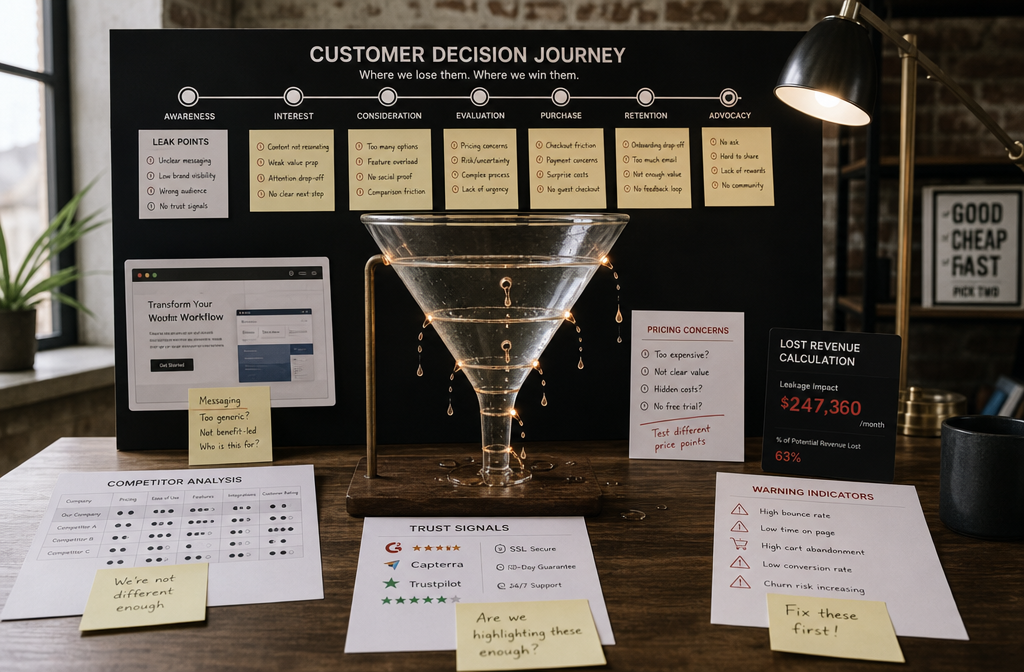
Small businesses lose sales opportunities primarily because prospects can’t quickly determine if they’re the right fit, trustworthy, or worth the investment compared to alternatives. The biggest culprit is unclear positioning that forces potential customers to work too hard to understand your value.
The top reasons deals disappear before contact:
Messaging problems – Your website doesn’t clearly explain what you do or who it’s for. Prospects can’t tell if your services match their needs, so they keep searching.
Trust deficits – Missing testimonials, case studies, or credentials make you seem risky compared to competitors who display social proof prominently.
Pricing anxiety – When pricing isn’t transparent, prospects assume you’re expensive and eliminate you from consideration without asking.
Poor timing – Your website doesn’t capture leads who aren’t ready to buy immediately, so they forget about you when they are ready.
Competitor comparison – Other businesses make it easier to understand their value, contact them, or feel confident in their choice.
We’ve built systems for hundreds of small businesses, and the pattern is always the same. The companies that clearly communicate their value, build trust quickly, and make it easy to take the next step capture significantly more leads from the same traffic.
What successful businesses do differently:
- Lead with specific outcomes they deliver, not just services they provide
- Display customer results and testimonials prominently on every key page
- Offer multiple ways to engage beyond just “contact us” forms
- Follow up automatically with prospects who aren’t ready to buy immediately
- Make their expertise obvious through helpful content and resources
The businesses that lose deals before conversations start are usually good at what they do; they just haven’t built systems that communicate that value effectively to website visitors.
How Much Money Am I Losing From Website Conversion Problems
Most small businesses lose between $50,000 and $200,000 annually from website conversion problems, depending on their traffic volume and average deal size. If you’re getting 1,000 website visitors monthly but only converting 1% to leads when you could be converting 3-5%, you’re missing significant revenue opportunities.
Here’s how the math works:
Let’s say you get 1,200 website visitors per month. With a typical 1% conversion rate, that’s 12 leads monthly. If you close 25% of leads at an average deal size of $5,000, you’re generating $15,000 in monthly revenue from your website.
But if we improve your conversion rate to 4% (which is achievable with the right system), those same 1,200 visitors generate 48 leads monthly. At the same close rate and deal size, that’s $60,000 in monthly revenue—a $45,000 monthly increase, or $540,000 annually.
Factors that determine your lost revenue:
- Current traffic volume – More visitors mean more missed opportunities
- Your average deal value – Higher-ticket services multiply the cost of lost leads
- Current conversion rate – Lower rates indicate bigger improvement potential
- Competition level – Prospects have more alternatives in competitive markets
- Sales cycle length – Longer cycles mean lost leads are harder to recover
We see businesses discover they were losing six figures annually once they start tracking properly. The problem is that most small business owners don’t realize how many potential customers visit their site and leave without any trace.
Quick calculation for your business:
Monthly visitors × improved conversion rate × close rate × average deal size = potential monthly revenue increase
The businesses we work with typically see 200-400% increases in lead generation within 90 days of implementing our complete done-for-you system.
Signs My Website Is Scaring Away Potential Customers
Your website is scaring away potential customers if visitors can’t immediately understand what you do, whether you’re credible, or how to take the next step. The clearest sign is when you have decent traffic but very few contact form submissions or phone calls.
Red flags that indicate customer fear or confusion:
Immediate bounce patterns – People leave within 10-15 seconds of arriving, suggesting your headline or value proposition isn’t clear enough.
High mobile bounce rates – If mobile visitors leave faster than desktop users, your mobile experience is likely frustrating or hard to navigate.
Low engagement on key pages – Your services or about pages have high exit rates, meaning people aren’t finding the information they need to feel confident.
Form abandonment – Visitors start filling out contact forms but don’t complete them, often due to asking for too much information upfront.
No repeat visitors – People don’t bookmark your site or return later, suggesting you didn’t make a strong enough impression.
We’ve found that scared prospects typically have three main concerns: “Is this business legitimate?” “Will they be too expensive?” and “Do they actually understand my problem?” Your website needs to address these fears immediately.
Trust-building elements that reduce customer fear:
- Professional headshots and team photos that humanize your business
- Specific client results and detailed case studies
- Industry certifications, awards, or association memberships
- Clear contact information, including a physical address
- Transparent pricing, or at least pricing ranges
- Detailed service explanations that show your expertise
The goal is to make prospects feel confident and informed, not confused or uncertain. When people feel comfortable with your business before contacting you, they’re much more likely to become customers.
Best Ways to Track Where Customers Drop Off Before Contacting Me
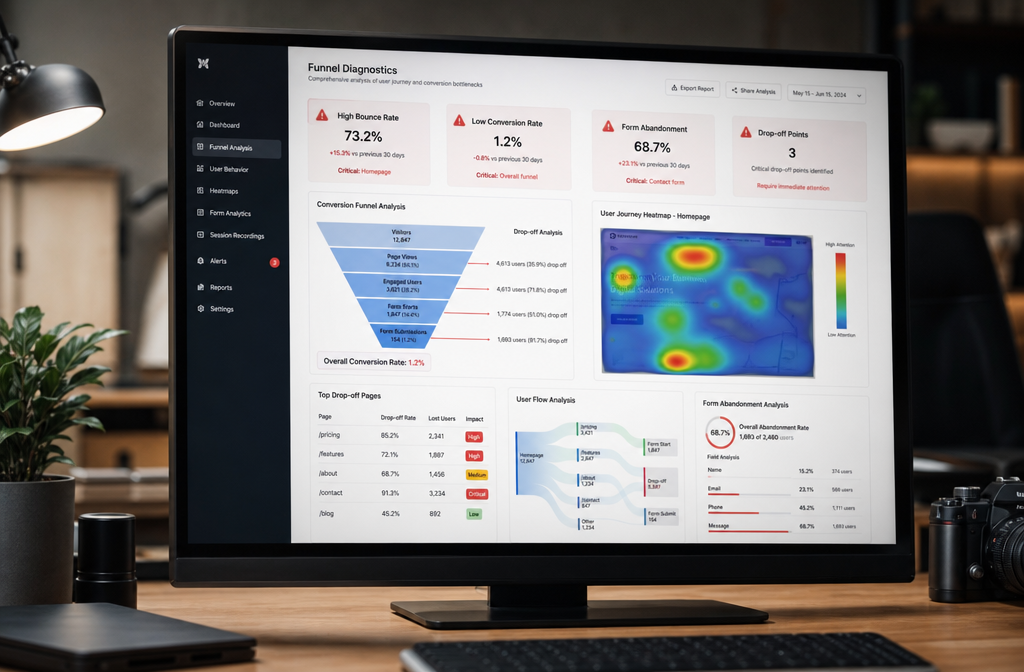
The best way to track where customers drop off is by implementing Google Analytics with goal tracking, heat mapping software, and form analytics that show exactly where prospects lose interest or encounter problems. This data reveals the specific moments potential customers decide to leave instead of contacting you.
Essential tracking tools for identifying drop-off points:
Google Analytics Goals – Set up conversion tracking for contact form submissions, phone calls, and key page visits. This shows which pages people visit before converting versus those who leave.
Heat mapping software – Tools like Hotjar or Crazy Egg show where visitors click, how far they scroll, and which elements they ignore completely.
Form analytics – Track which form fields cause people to abandon contact forms and where in the process they typically give up.
User session recordings – Watch actual visitor sessions to see confusion points, navigation struggles, or content that doesn’t hold attention.
We implement these tracking systems as part of our complete done-for-you platform because most small business owners don’t have time to set up and monitor multiple analytics tools properly.
Key metrics to monitor weekly:
- Page-by-page bounce rates – Identify which content isn’t engaging visitors
- Traffic source performance – Shows whether Google, social media, or referral visitors convert better
- Mobile vs desktop behavior – Reveals platform-specific problems
- Time spent on key pages – Indicates whether your content is compelling enough
- Contact form completion rates – Measures how many people start versus finish forms
What successful businesses track differently:
Instead of just counting website visits, they focus on conversion paths. They know which pages prospects view before contacting them, how long the decision process takes, and what content builds the most confidence.
The businesses that capture the most leads track micro-conversions too—email signups, resource downloads, or phone number clicks—not just final contact form submissions. This helps them nurture prospects who aren’t ready to buy immediately.
Common Website Mistakes That Make Customers Not Trust My Business
Customers won’t trust your business if your website looks outdated, lacks social proof, or makes bold claims without evidence. The most damaging trust-killer is having no visible customer testimonials or results, which makes prospects assume you’re either new or unsuccessful.
Trust-destroying mistakes we see constantly:
Generic stock photos – Using obvious stock images instead of real photos of your team, office, or actual work makes you seem fake or impersonal.
No customer testimonials – Prospects need to see that real people have hired you and gotten good results. Without testimonials, they assume you haven’t helped anyone.
Outdated design or content – Copyright dates from years ago, broken links, or old-fashioned layouts suggest you might not be actively running your business.
Missing contact information – No physical address, phone number, or team member names makes you seem like you’re hiding something.
Overpromising without proof – Claims like “best in the industry” or “guaranteed results” without supporting evidence make you sound unreliable.
Poor grammar or spelling – Typos and errors suggest a lack of attention to detail, which makes prospects worry about your work quality.
We help businesses build trust immediately by implementing what we call “credibility stacking”—multiple trust signals on every important page that reinforce your expertise and reliability.
Trust-building elements that work:
- Specific client results with names and companies (when possible)
- Professional team photos with brief bios showing expertise
- Industry certifications or association memberships prominently displayed
- Case studies that detail problems solved and outcomes achieved
- Recent blog posts or updates showing active business engagement
- Clear guarantees or service standards you commit to meeting
The goal is to make prospects feel confident they’re dealing with a legitimate, successful business that will deliver on its promises. When trust is established quickly, people are much more likely to contact you instead of continuing their search.
How to Improve a Website to Stop Losing Leads
To stop losing leads, your website needs to immediately communicate what you do, who it’s for, and why prospects should choose you over competitors. The most effective improvement is clarifying your value proposition and making it the first thing visitors see when they land on your site.
Priority improvements that capture more leads:
Clarify your headline and subheadline – Replace vague language with specific outcomes you deliver. Instead of “Marketing Solutions,” use “Help B2B Service Companies Generate 50+ Qualified Leads Monthly.”
Add prominent testimonials – Place customer results and testimonials above the fold on your homepage and key service pages.
Simplify navigation – Make it easy to find your services, pricing information, and contact details within two clicks.
Create multiple engagement options – Offer free resources, consultations, or assessments beyond just “contact us” forms.
Optimize for mobile – Ensure your site loads quickly and works perfectly on smartphones since most prospects browse on mobile first.
We build complete done-for-you systems that address all these elements simultaneously because piecemeal improvements often don’t generate significant results.
Advanced lead capture strategies:
- Exit-intent popups that offer valuable resources when people start to leave
- Automated follow-up sequences for prospects who aren’t ready to buy immediately
- Live chat or chatbots that answer common questions instantly
- Social proof notifications showing recent customer activity
- Clear next steps on every page, guiding visitors toward conversion
What makes the biggest difference:
The businesses that stop losing leads focus on the prospect’s decision-making process, not just their own services. They anticipate questions, address concerns, and make it easy for visitors to take small steps toward becoming customers.
Instead of hoping prospects will figure out your value, successful businesses spell it out clearly and provide multiple ways for interested visitors to engage at their comfort level.
Tools to Help Understand Why Customers Are Leaving My Site
The most effective tools for understanding why customers leave are Google Analytics for traffic patterns, Hotjar for user behavior visualization, and Microsoft Clarity for session recordings. These tools reveal exactly where prospects lose interest and what prevents them from contacting you.
Essential diagnostic tools we recommend:
Google Analytics 4 – Free tool that shows bounce rates, page performance, and conversion paths. Set up goals to track contact form submissions and phone calls.
Hotjar or Microsoft Clarity – Heat mapping and session recording tools that show where visitors click, scroll, and spend time. Clarity is free and provides excellent insights.
Google Search Console – Reveals which search terms bring visitors to your site and whether your pages match search intent.
PageSpeed Insights Identifies loading speed issues that cause immediate visitor loss, especially on mobile devices.
We integrate these analytics tools into our all-in-one platform so business owners get actionable insights without managing multiple dashboards or learning complex software.
Advanced diagnostic approaches:
- User testing services like UserTesting.com, where real people navigate your site while thinking aloud
- Conversion optimization tools that A/B test different headlines, layouts, or calls-to-action
- Form analytics that show which fields cause form abandonment
- Customer feedback surveys asking why visitors didn’t contact you
What successful businesses do with this data:
Instead of just collecting analytics, they act on insights quickly. If heat maps show people aren’t scrolling to see testimonials, they move social proof higher on the page. If session recordings reveal navigation confusion, they simplify their menu structure.
The key is focusing on patterns, not individual visitor behavior. When multiple people struggle with the same elements, those become priority fixes that can dramatically improve lead generation.
Most small business owners don’t have time to analyze multiple tools and implement improvements. That’s why we build and manage these systems as part of our complete done-for-you service.
What Makes Customers Decide Not to Fill Out a Contact Form
Customers decide not to fill out contact forms when they’re asked for too much information upfront, don’t trust the business enough yet, or aren’t convinced the service is worth the potential sales pressure. The biggest barrier is requesting detailed information before establishing value and trust.
Common form barriers that prevent submissions:
Too many required fields – Asking for company size, budget, timeline, and detailed needs before prospects are ready to share creates friction.
No clear value exchange – Forms that don’t explain what happens next or what benefit the prospect receives for their information.
Trust concerns – Visitors worry about spam, sales calls, or sharing contact details with unfamiliar businesses.
Unclear next steps – People don’t know if they’ll get a call, email, or what the follow-up process involves.
Poor timing – The form appears too early in the visitor’s research process before they’re ready to engage.
We design contact forms that feel like helpful next steps rather than information grabs. Our approach focuses on making it easy for prospects to get value while giving businesses the information they need.
Form optimization strategies that work:
- Minimize required fields to just name, email, and one qualifying question
- Explain the value clearly – “Get a custom growth plan for your business.”
- Set expectations – “We’ll send you a detailed analysis within 24 hours.”
- Offer alternatives – Phone number, live chat, or calendar booking options
- Use progressive profiling – Gather additional information in follow-up interactions
What high-converting forms do differently:
They focus on giving value rather than extracting information. Instead of “Contact Us,” successful forms offer specific outcomes like “Get Your Free Marketing Audit” or “Download Our Pricing Guide.”
The businesses that capture the most leads make their forms feel like the natural next step for interested prospects, not a commitment that requires significant trust or effort.
Differences Between High-Converting and Low-Converting Business Websites
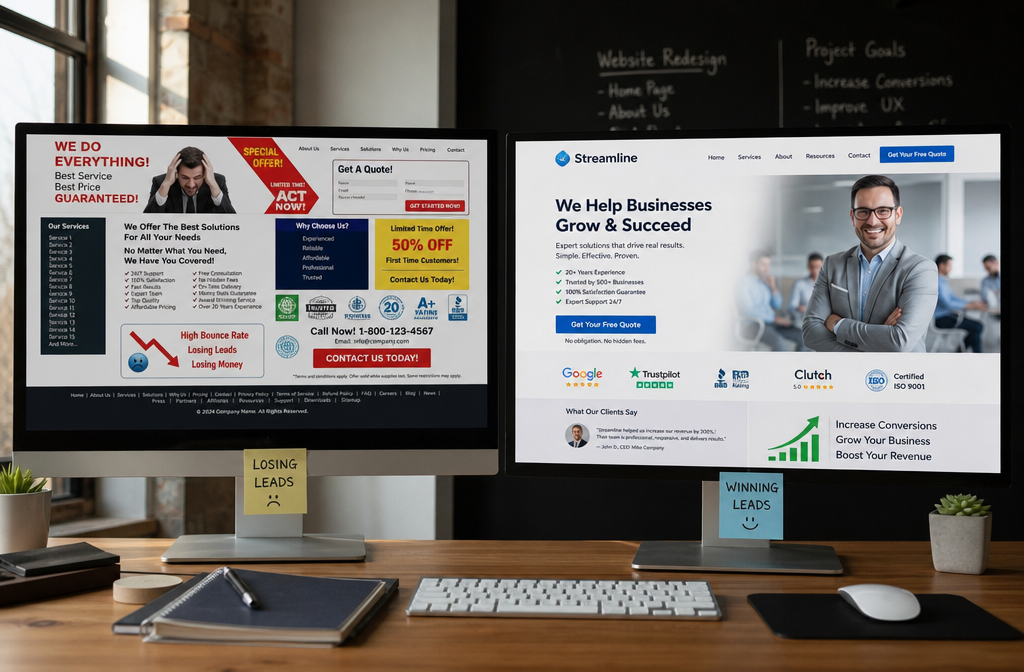
High-converting business websites immediately communicate specific value propositions and make it easy for prospects to take next steps, while low-converting sites use generic messaging and create friction in the decision-making process. The difference often comes down to clarity and user experience rather than design aesthetics.
High-converting websites’ characteristics:
Clear value propositions – Specific outcomes and benefits rather than vague service descriptions. “Increase qualified leads by 300%” instead of “Marketing Services.”
Prominent social proof – Customer testimonials, case studies, and results visible immediately, not buried on separate pages.
Multiple engagement options – Free resources, consultations, assessments, and various ways to connect beyond basic contact forms.
Mobile-optimized experience – Fast loading, easy navigation, and readable content on all devices.
Trust signals everywhere – Team photos, certifications, client logos, and credentials prominently displayed.
Low-converting websites problems:
Generic messaging – Sounds like every competitor with no clear differentiation or specific value offered.
Hidden information – Important details about services, pricing, or processes require multiple clicks to find.
Single conversion path – Only “contact us” forms with no options for prospects who aren’t ready for sales conversations.
Poor mobile experience – Difficult navigation, slow loading, or content that doesn’t display properly on phones.
Missing credibility – No testimonials, case studies, or trust signals to reduce prospect anxiety.
We build high-converting websites as part of our complete done-for-you system because the difference between good and great conversion rates can mean hundreds of thousands in additional revenue annually.
What makes the biggest impact:
The highest-converting websites anticipate prospects’ questions and concerns, then address them proactively. They make it easy for visitors to self-qualify and choose their level of engagement rather than forcing everyone through the same contact process.
Successful businesses also capture leads who aren’t ready to buy immediately through valuable content offers and automated follow-up systems that nurture prospects until they’re ready for conversations.
Is My Pricing Page Causing Me to Lose Sales

Your pricing page is likely causing lost sales if it’s either completely hidden or provides no context about value, investment levels, or what’s included in your services. Most small businesses either avoid pricing entirely or present it in ways that create anxiety rather than confidence.
Pricing page problems that lose sales:
No pricing information at all – Forces prospects to contact you just to learn if you’re in their budget range, which many won’t do.
Prices without context – Listing fees without explaining what’s included, what results to expect, or how you’re different from cheaper alternatives.
Only high-end options – Showing expensive packages without entry-level alternatives makes you seem unaffordable to budget-conscious prospects.
Confusing package structures – Complex pricing tiers that make it hard to understand which option fits their needs.
No clear value justification – Prices that seem high without explanation of why your service is worth the investment.
We help businesses create pricing pages that build confidence and qualify prospects rather than scaring them away. The goal is transparency that attracts right-fit customers while filtering out poor matches.
Effective pricing page strategies:
- Provide ranges rather than exact prices when services are customized
- Explain what’s included in each package or service level
- Show value through outcomes – ROI, time savings, or results achieved
- Offer multiple options, including entry-level and premium alternatives
- Include testimonials from customers who achieved great results
- Address common concerns about pricing, value, and return on investment
What successful businesses do differently:
They use pricing pages as sales tools that educate prospects about value rather than just listing costs. They help visitors understand which option fits their situation and what results they can expect.
The businesses that convert best also capture leads from pricing page visitors who aren’t ready to buy immediately through follow-up systems and nurturing sequences.
How Do Successful Small Businesses Prevent Losing Leads
Successful small businesses prevent losing leads by implementing automated systems that capture prospect information early, nurture relationships over time, and provide multiple ways for interested visitors to engage at their comfort level. They don’t rely on hoping prospects will contact them when ready.
Lead prevention strategies that work:
Multiple capture points – Free resources, assessments, newsletters, and consultations that appeal to prospects at different stages of their buying process.
Automated follow-up sequences – Email systems that stay in touch with prospects who aren’t ready to buy immediately, providing value while building trust over time.
Retargeting campaigns – Ads that bring previous website visitors back when they’re further along in their decision-making process.
Content that demonstrates expertise – Blog posts, guides, and resources that help prospects while showcasing your knowledge and approach.
Clear value communication – Messaging that immediately explains what you do, who it’s for, and why prospects should choose you over alternatives.
We build these complete systems for small businesses because most owners don’t have time to create and manage multiple lead capture and nurturing processes while running their companies.
Advanced lead retention techniques:
- Progressive engagement – Starting with low-commitment interactions and gradually building relationships
- Personalized follow-up based on which pages prospects visited or resources they downloaded
- Social proof campaigns – Sharing customer success stories and results regularly
- Educational content series – Multi-part resources that keep prospects engaged over weeks or months
- Seasonal outreach – Staying connected during natural buying cycles for your industry
What makes the biggest difference:
The most successful businesses treat lead generation as a system, not individual tactics. They capture prospects early, provide ongoing value, and make it easy for people to engage when they’re ready rather than hoping timing will align perfectly.
They also recognize that most prospects need multiple touchpoints before making buying decisions, so they build relationships over time instead of expecting immediate conversions from every website visitor.
FAQ
How quickly do prospects decide whether to contact a business?
Most prospects make their initial decision within 8-15 seconds of landing on your website. If your value proposition isn’t immediately clear, they’ll typically leave and try a competitor rather than spending time figuring out what you do.
What’s the average website conversion rate for small businesses?
Most small business websites convert 1-2% of visitors into leads. However, with proper messaging, design, and lead capture systems, conversion rates of 4-6% are achievable, which can dramatically increase revenue from existing traffic.
Should I include pricing on my website?
Yes, you should provide pricing ranges or starting prices to help prospects self-qualify. Hiding pricing entirely forces interested prospects to contact you just to learn if you’re affordable, which many won’t do, resulting in lost opportunities.
How many contact form fields should I use?
Limit contact forms to 3-4 fields maximum: name, email, phone (optional), and one qualifying question. Each additional field reduces completion rates significantly, especially on mobile devices.
What’s the most important element on my homepage?
Your headline and subheadline are most critical. They should immediately communicate what you do, who it’s for, and what outcome prospects can expect. Everything else supports this core message.
How can I tell if my website is mobile-friendly enough?
Check your mobile bounce rate in Google Analytics. If it’s significantly higher than desktop (above 70%), your mobile experience needs improvement. Also, test your site personally on different phone sizes.
What trust signals matter most to prospects?
Customer testimonials with specific results, professional team photos, industry certifications, and detailed case studies build trust fastest. Prospects need to see evidence that real people have hired you and achieved good outcomes.
How long should prospects spend on my website before contacting me?
There’s no ideal time, but successful websites accommodate both quick decision-makers (who convert in minutes) and researchers (who may visit multiple times over weeks). Provide clear paths for both types of prospects.
Should I use live chat on my website?
Live chat can increase conversions by 20-30% when implemented properly. It works best for answering quick questions and capturing leads who might otherwise leave without engaging.
How often should I update my website content?
Update testimonials, case studies, and blog content regularly to show active business engagement. Outdated copyright dates or old news can make prospects question if you’re still actively operating.
What’s the biggest mistake small businesses make with their websites?
The biggest mistake is assuming prospects will work to understand your value. Successful websites make everything immediately clear: what you do, who it’s for, why you’re different, and what the next step should be.
How can I capture leads who aren’t ready to buy immediately?
Offer valuable free resources like guides, assessments, or consultations in exchange for contact information. Then use automated email sequences to nurture these prospects until they’re ready for sales conversations.
Conclusion
Your business loses potential customers every single day before you even know they exist. These prospects visit your website, evaluate your services, and choose competitors, all while you remain completely unaware of the missed opportunities.
The solution isn’t hoping for better timing or more traffic. It’s building systems that capture prospects early, communicate value clearly, and nurture relationships until people are ready to buy.
We’ve seen hundreds of small businesses transform their lead generation by implementing complete done-for-you systems that work from day one. Instead of losing deals before conversations start, they capture 3-5 times more leads from the same website traffic.
Your next steps:
Stop accepting that prospects will contact you when they’re ready. Build systems that engage them immediately and stay connected throughout their decision-making process.
Focus on clarity over creativity. Make sure every website visitor immediately understands what you do, who it’s for, and why they should choose you.
Implement multiple ways for prospects to engage at their comfort level, not just contact forms that require high commitment upfront.
The businesses that grow predictably don’t hope for leads—they build systems that capture and nurture them automatically. Ready to stop losing deals before they start? We build the complete system for you, so it works from day one with no tech knowledge required.

