
7 Sales Tasks Every Small Business Should Automate Now
What Is Sales Automation and How Does It Work?
Sales automation is software that handles repetitive sales steps automatically, based on rules you set once. Instead of a person manually sending an email, updating a spreadsheet, or texting a reminder, the system does it the moment a trigger happens, like a form submission or a missed call.
Here’s how it works in practice. A lead fills out a form on your website. That action triggers three things at once: the lead’s information saves into your CRM, an automatic reply goes out confirming you received their message, and the lead gets assigned to the right team member. All of that happens in seconds, without anyone lifting a finger.
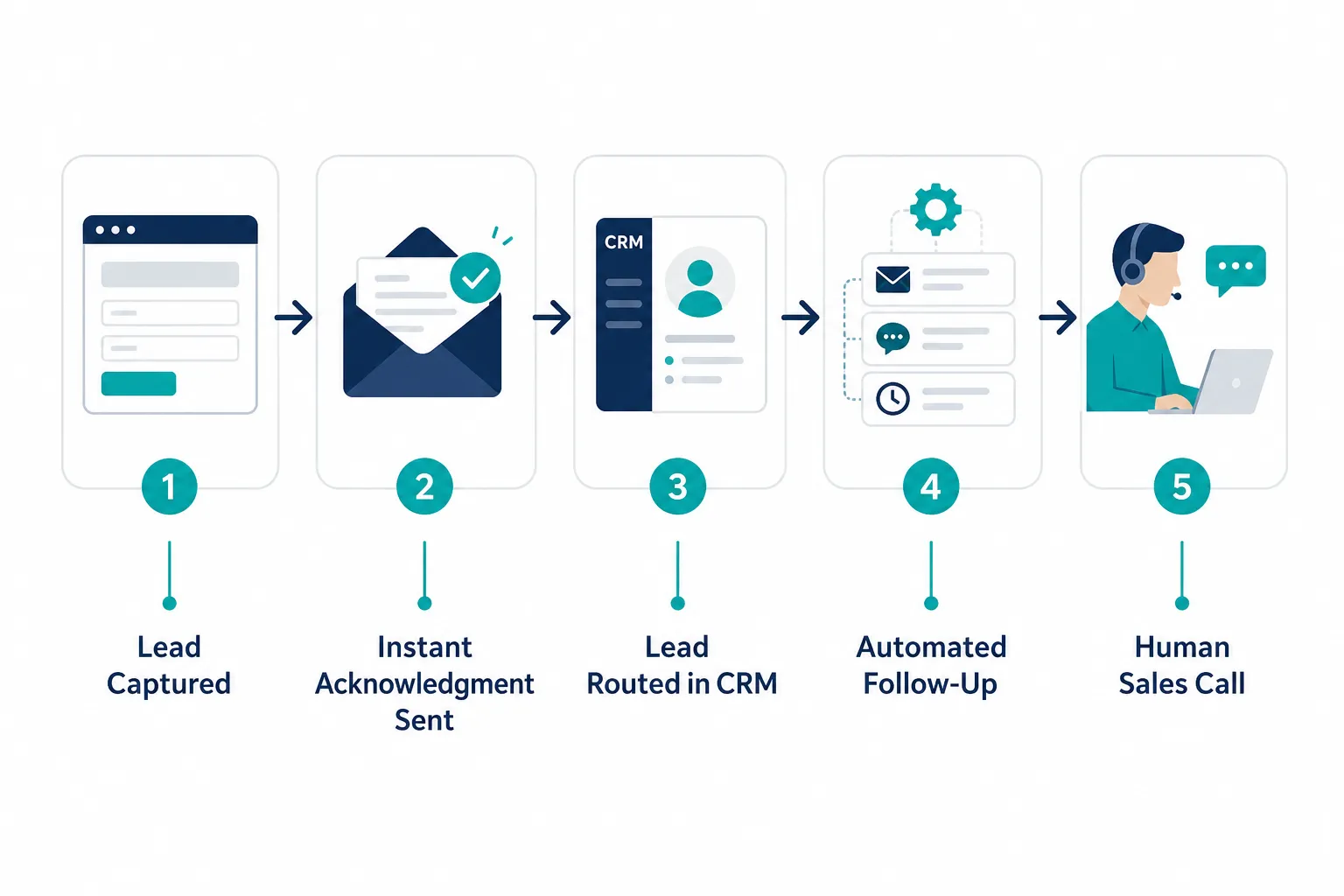
This is the core idea behind sales workflow automation: connect the steps that always happen the same way, so they happen every time, correctly, without depending on someone remembering to do it. For small businesses without a dedicated marketing or sales operations person, this consistency is the real win. It’s not about working faster. It’s about never missing a step.
Which Sales Tasks Should Small Businesses Automate First?
Small businesses should automate the tasks that repeat constantly and directly affect whether a lead gets a response. These are the moments where speed and consistency matter more than personal judgment, which makes them ideal candidates for small business automation.
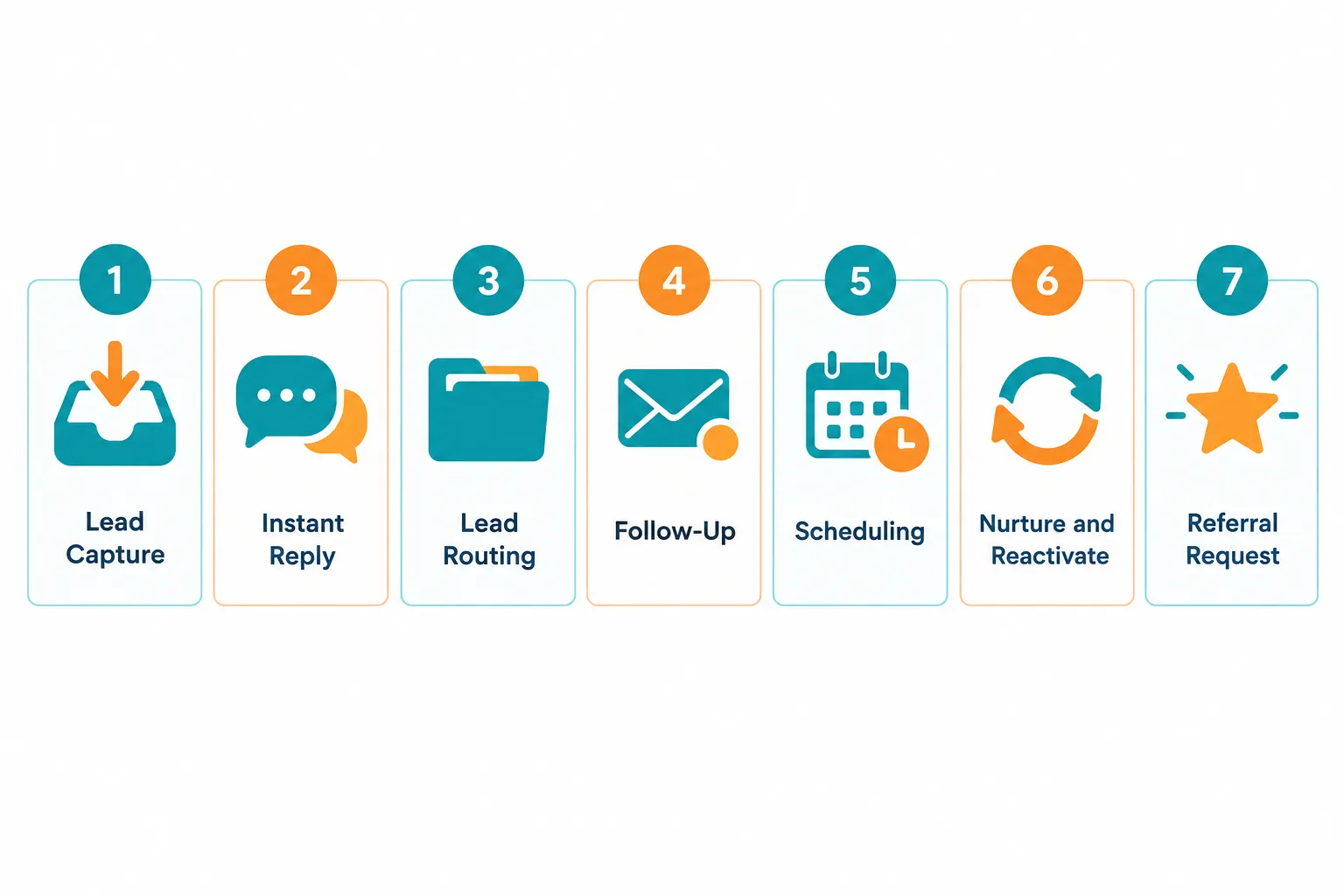
Below is the priority order we recommend, based on how much revenue risk each task carries when it’s handled manually.
| Task | What Gets Automated | Biggest Risk If Manual |
|---|---|---|
| 1. Lead capture | Collecting inquiries from web, phone, chat, and social | Leads never get recorded |
| 2. Immediate acknowledgment | Instant reply confirming receipt | Lead assumes you’re unresponsive |
| 3. Lead organization and assignment | Routing leads in your CRM to the right person | Leads sit untouched or duplicate |
| 4. Follow-up emails and texts | Scheduled outreach after first contact | Leads go cold within days |
| 5. Appointment scheduling and reminders | Booking links and reminder texts | No-shows and back-and-forth emails |
| 6. Lead nurturing and reactivation | Ongoing touches to leads not ready yet | Warm leads are forgotten entirely |
| 7. Post-sale review and referral requests | Requests sent after the job is done | Missed reviews and referrals |
Let’s break each one down: what gets automated, why it matters, the problem it solves, and what should stay human.
1. Lead Capture
What gets automated: every inquiry from your website, phone system, chatbot, and social channels flows into one place automatically, instead of living in separate inboxes or notepads.
Why it matters: if a lead comes in through your contact form on a Saturday and nobody checks that inbox until Monday, you’ve already lost ground. Automated capture means nothing depends on someone remembering to check five different places.
Problem it solves: scattered lead sources are the number one reason small businesses lose track of inquiries. AI-powered lead capture pulls every source into a single system so nothing falls through the cracks.
What stays human: deciding how to qualify or respond to unusual or high-value inquiries still needs a real person’s judgment.
2. Immediate Inquiry Acknowledgment
What gets automated: the moment someone reaches out, they get an instant reply confirming their message was received, often within seconds.
Why it matters: buyers today expect a fast response. A lead that hears nothing for hours starts calling competitors. An automatic acknowledgment buys you time without leaving the lead wondering if anyone saw their message.
Problem it solves: it removes the “silence gap” between inquiry and first human contact, which is where most small businesses lose leads before a salesperson even gets involved.
What stays human: the actual sales conversation, the answers to specific questions, and any pricing discussion still need a real team member.
3. Lead Organization and Assignment
What gets automated: CRM automation sorts new leads by source, service interest, or location, and assigns them to the right person automatically, without anyone manually copying details into a spreadsheet.
Why it matters: small sales teams waste hours a week just figuring out who owns which lead. Automatic routing removes that guesswork completely.
Problem it solves: duplicate follow-ups, leads assigned to the wrong person, and inquiries that quietly disappear because nobody claimed them.
What stays human: your team still decides how to prioritize accounts and how to handle exceptions, like a lead that needs a specialist instead of the default assignment.
4. Follow-Up Emails and Text Messages
What gets automated: automated lead follow-up sends a sequence of emails or texts after first contact, spaced out over days or weeks, without a person triggering each one.
Can you automate lead follow-up emails? Yes. This is one of the most reliable and widely used forms of sales automation, and it works whether a lead becomes a customer in two days or two months. A good sequence includes a mix of helpful information, answers to common questions, and a clear next step, not just repeated “just checking in” messages.
Why it matters: most sales are lost not because the offer was wrong, but because nobody followed up enough times. Studies on sales cycles consistently show that buyers need multiple touches before they’re ready to commit, and manual follow-up almost always tapers off after the second or third attempt.
Problem it solves: inconsistent follow-up, forgotten leads, and salespeople who run out of time to send a fifth or sixth message.
What stays human: once a lead responds with a real question or shows buying signals, a person should take over the conversation immediately.
5. Appointment Scheduling and Reminders
What gets automated: leads book time directly on your calendar through a link, and the system sends automatic reminder texts or emails before the appointment.
Why it matters: back-and-forth emails trying to find a time waste days. Automatic reminders also cut down no-shows significantly, since a text reminder an hour before an appointment is far more effective than hoping someone remembers.
Problem it solves: scheduling delays that stall the sales process and appointments that fall apart because nobody sent a reminder.
What stays human: the actual meeting or sales call, and any rescheduling that requires understanding a client’s specific situation.
6. Lead Nurturing and Reactivation
What gets automated: leads who aren’t ready to buy get added to an ongoing sequence of helpful emails or texts, and old leads who went quiet get automatically re-engaged after a set period.
Why it matters: not every lead is ready today. Without a system, “not ready yet” usually means “never followed up with again.” Automated nurturing keeps your business top of mind until timing changes.
Problem it solves: warm leads that get abandoned because a salesperson moved on to newer inquiries, and old contacts that could have converted with one more touch months later.
What stays human: recognizing when a nurtured lead is finally ready to talk, and having that conversation personally.
7. Post-Sale Review and Referral Requests
What gets automated: after a job or sale is complete, the system automatically sends a review request and, a bit later, a referral request.
Why it matters: most happy customers never leave a review or send a referral, not because they don’t want to, but because nobody asked at the right moment. Automating the ask means it happens every single time, consistently.
Problem it solves: inconsistent reputation-building and missed word-of-mouth growth, which is often the cheapest source of new leads a small business has.
What stays human: thanking customers personally, and following up directly with anyone who leaves a less-than-glowing review.
How to Set Up Automated Lead Scoring
Automated lead scoring assigns points to a lead based on their behavior and details, so your team knows who to call first. It works by setting rules in your CRM: a filled-out form might be worth 10 points, opening three emails might add 5 more, and requesting a quote might add 20.
To set it up:
- List the actions that usually signal buying intent, like requesting a quote or visiting your pricing page.
- Assign point values based on how strongly each action predicts a sale.
- Set a threshold, for example, 50 points, that flags a lead as “hot” and triggers a notification to your sales team.
- Review and adjust the scoring every few months as you see which leads actually convert.
Choose lead scoring if you get more than 20 to 30 leads a month and your team struggles to know who to prioritize. If you get fewer than that, a simple manual review often works just as well, at least at first.
Common Mistakes When Automating Sales Processes
The most common mistake is automating everything at once instead of starting with the highest-impact task. This overwhelms the team, breaks workflows nobody tested, and often gets abandoned within a few weeks.
Other frequent mistakes:
- Using disconnected tools. A separate form tool, a separate CRM, and a separate texting app that don’t talk to each other create more manual work, not less.
- Writing follow-up sequences that sound robotic. Automated does not mean impersonal. Messages should read as if a person wrote them.
- Never reviewing performance. Automation set up once and never checked can quietly send outdated information or stop working after a software update.
- Skipping the human handoff. If a lead replies to an automated message and nobody notices for three days, you’ve recreated the original problem.
- Automating tasks that need judgment. Pricing negotiations, complaint resolution, and complex proposals should never run on autopilot.
Edge case: if your business handles highly regulated or highly personalized sales, like custom legal services, automate the administrative steps (scheduling, reminders, acknowledgments) but keep every substantive conversation human.
Does Sales Automation Actually Increase Revenue?
Sales automation increases revenue mainly by preventing lost leads, not by creating new demand out of nowhere. Faster response times, consistent follow-up, and fewer dropped inquiries mean more of the leads you already have turn into paying customers.
Research from sources like the Harvard Business Review and various B2B response-time studies has long shown that businesses responding to leads within minutes convert at meaningfully higher rates than those that take hours. Automation is the practical way small teams achieve that speed without hiring extra staff to sit by the phone.
Choose automation as a revenue lever if your current problem is inconsistent follow-up or slow response time. If your problem is a lack of leads coming in at all, automation helps you convert better, but you’ll still need to pair it with lead generation.
What Sales Tasks Shouldn’t Be Automated?
Tasks that require judgment, negotiation, or emotional nuance should stay human. This includes closing calls, pricing negotiations, complaint handling, and any conversation where the lead has a complex or unusual situation.
A simple rule: automate the steps that happen the same way every time. Keep a person involved wherever the outcome depends on reading the situation. For example, sending a reminder text is automatable. Deciding whether to offer a discount to keep a hesitant client is not.
Sales Automation vs. Hiring a Sales Rep
Sales automation and hiring a sales rep solve different problems, and most small businesses need some of both, not one instead of the other. Automation handles repetitive, time-sensitive tasks at scale. A sales rep handles conversations, relationship-building, and closing.

Choose automation first if your leads are going cold because nobody follows up fast enough, or if your team spends hours a week on data entry and scheduling. Choose hiring if your bottleneck is genuinely not having enough people to have sales conversations, not a lack of process.
In practice, the strongest setup is a lean sales rep supported by automated follow-up systems that handle the busywork, so that person spends their time talking to leads instead of chasing them down.
How Much Does Sales Automation Software Cost for Small Teams?
Sales automation software for small teams typically ranges from free entry-level plans to a few hundred dollars a month, depending on how many contacts you manage and how many features you need. Basic CRM automation and email sequences tend to sit at the lower end. Multi-channel systems that combine texting, scheduling, and reporting cost more.
The bigger cost small businesses underestimate isn’t the software price. It’s the time spent trying to connect multiple disconnected tools, troubleshoot integrations, and train staff on systems that were never built to work together. That’s often where budgets quietly leak.
Best Sales Automation Tools for Small Business
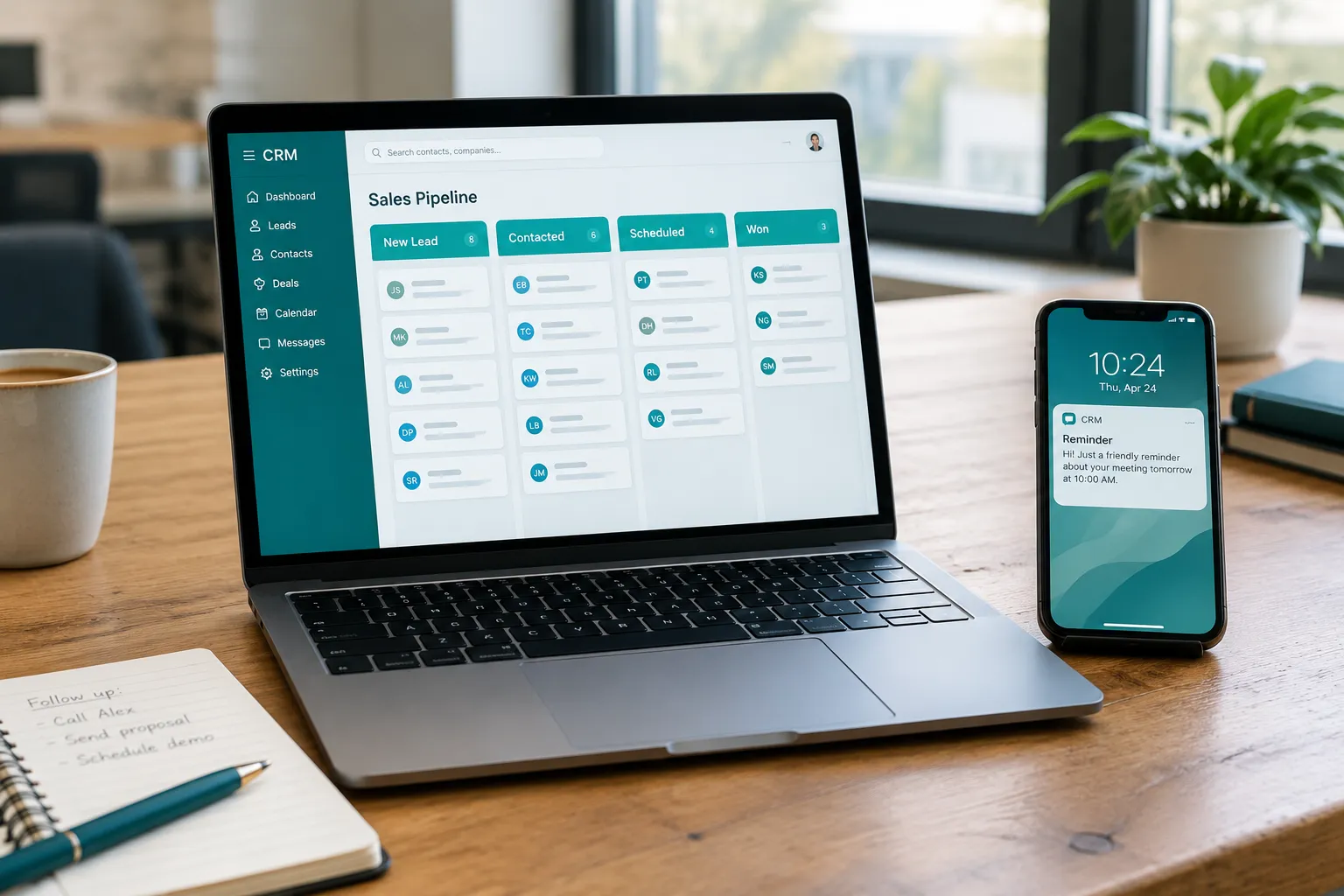
The best sales automation tools for a small business are the ones that connect lead capture, follow-up, and scheduling in a single system, instead of requiring you to stitch together separate apps. Look for a platform that handles the full lead journey, not just one piece of it.
When evaluating tools, prioritize:
- Built-in CRM automation, so leads are captured and nurtured automatically without manual entry.
- Two-way texting, since texts get read faster than email.
- Appointment scheduling with automatic reminders.
- Reporting that shows where leads are getting stuck.
This is exactly the gap SalesHubHQ was built to close. Instead of asking a small business owner to piece together a form tool, a CRM, a texting app, and a scheduler, SalesHubHQ is an all-in-one platform that connects lead capture, automated follow-up, scheduling, and review requests into one connected system. We build the website and content, set up AI-powered lead capture, and configure the automated follow-up systems so everything is ready from day one. No tech knowledge required on your end. It’s a complete done-for-you system, built and implemented for your business, not a toolkit you have to figure out alone.
Free sales automation tools for startups exist too. Many CRMs offer a free tier with basic contact management and simple email automation. These work fine at first, but most solo founders outgrow them quickly once follow-up sequences, texting, and scheduling need to work together instead of separately.
Common Mistakes When Automating Sales Processes (Solo Founders and Small Teams)
Solo founders and small teams tend to make one specific mistake: waiting until they have “more time” to set up automation, when the lack of automation is exactly what’s eating their time. Sales automation for solopreneurs works best when it’s treated as infrastructure you set up once, not a project for later.
Sales automation for solo founders should focus on the tasks that would otherwise pull them away from actually doing the work: automated acknowledgment, follow-up sequences, and scheduling links top the list. A solo founder doesn’t have a receptionist or an assistant to catch every lead, which makes these three tasks even more valuable than they are for a team with a few employees.
How Long Does It Take to See Results From Sales Automation?
Most small businesses notice results within 30 to 60 days of setting up core automation, particularly faster response times and fewer leads slipping through the cracks. Full impact on close rates and referral volume usually shows up over two to three months, since it takes time for follow-up and nurturing sequences to run their full course.
Choose to measure results by tracking three numbers before and after: average response time, percentage of leads that get a second follow-up, and number of appointments booked per month. These three metrics move fastest and tell you whether the system is actually working.
How to Automate Repetitive Sales Tasks Without Losing the Personal Touch
You avoid losing the personal touch by writing automated messages the way you’d actually talk, and by making sure a real person steps in the moment a lead shows genuine interest. Automation should handle the predictable parts of the process. People should handle everything that requires listening.
A few practical guardrails:
- Write follow-up emails and texts in a conversational tone, using the lead’s name and specific details when possible.
- Set up notifications so a team member knows immediately when a lead replies to an automated message.
- Review your sequences every quarter to make sure they still sound like your business, not a generic template.
- Never let a bot handle a complaint, a negotiation, or a question that requires real problem-solving.
Done right, leads captured and nurtured automatically still feel like they’re talking to a real business that pays attention, because a person is there the moment it matters.
You Don’t Need to Automate Everything at Once
Trying to automate all seven tasks in the same week is how most small businesses burn out on new systems. Pick one starting point: the task currently taking up the most staff time, or the one where you’re most sure leads are slipping away.
Ask yourself:
- Which task does my team complain about the most?
- Where do leads go quiet after we’ve had a first conversation?
- What repetitive task, if it disappeared tomorrow, would free up the most time?
Whatever your answer, that’s your starting point. Build that one system well, confirm it’s working, then move to the next task on the list.

